Go to Playbook Main Page
Go to Ingestion Main Page
Go to File Ingestion Main Page
Go to Ingestion Design
Go to Modular Components
Go to Ingestion Inputs & Outputs
Go to File Ingestion Using Python
Go to File Ingestion Using Autoloader
File Ingestion#
This document explains the process of ingesting raw JSON files from an Azure Data Lake landing zone into the Databricks Bronze Layer. The pipeline enables ingestion through three different methods based on scalability, processing needs, and quality enforcement.
The Bronze Layer is part of the Databricks Lakehouse architecture and acts as the trusted raw repository for validated data. It sets the foundation for further cleansing and transformations in the Silver and Gold layers.
This document is organized into the following structure, covering all the essential aspects of this pipeline:
Design and Architecture#
Architecture Overview#
The pipeline architecture supports multiple ingestion methods while ensuring operational consistency. Below is the high-level architecture:
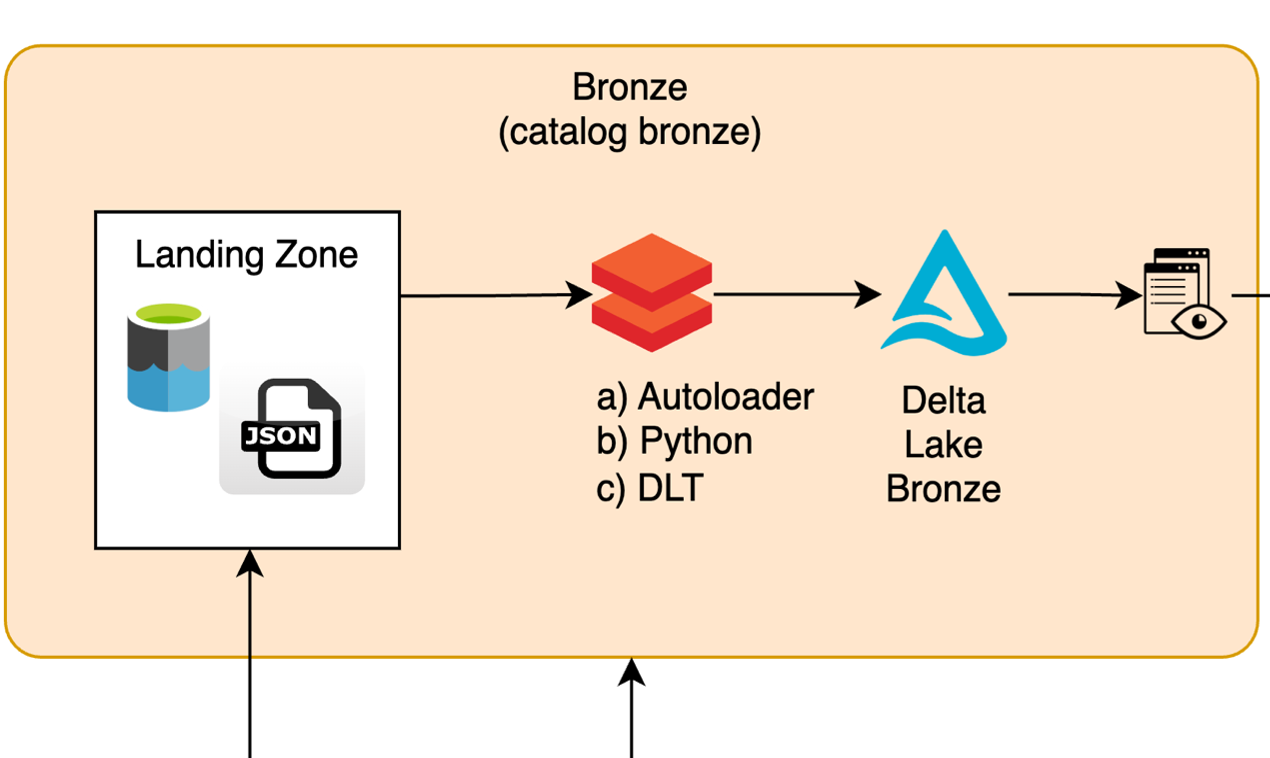
High-Level Process Flow#
-
Landing Zone: - Incoming raw files are stored in an Azure Data Lake (ADLS2 Blob Storage) Landing Zone, mapped as Databricks Volume to Unity Catalog. - Files can include structured, semi-structured, or unstructured data (e.g., JSON, CSV).
-
Data Validation and Enrichment: - Files are read incrementally (Autoloader), in batch (Python-based custom code), or via declarative pipelines (DLT). - Metadata attributes like
ingestion_time,file_name,Job_idand others are added for traceability. - Invalid or malformed records are routed to a bad files directory. -
Persisting Data in the Bronze Layer: - Data is appended to Delta tables in the Bronze Layer with partitioned or ACID-compliant storage. - Enriched metadata enables lineage and operational observability.
-
Processed File Management: - Successfully processed files are moved to the loaded directory.
Key Components#
| Component | Description |
|---|---|
| Landing Zone | Staging area in Azure Data Lake where raw JSON files reside. |
| Autoloader Ingestion | Real-time ingestion tool with schema evolution capabilities, optimized for scalability. |
| Python-Based Pipeline | Custom batch ingestion pipeline for flexibility in processing. |
| Delta Live Tables | Declarative framework for building managed pipelines with built-in lineage and quality checks. |
| Bronze Layer | Delta table layer to store raw, validated data with metadata for traceability and ACID compliance. |
| File Management | Handles successful file movement to avoid reprocessing and routing errors for debugging. |
Ingestion Techniques#
As per the project requirements and developer preference, you can choose the technique:
Autoloader:#
Best suited for real-time, incremental file ingestion.
Python-Based Custom Code:#
Provides flexibility and control for batch processing but can increase complexity and require significant maintenance.
Delta Live Tables (DLT):#
Declarative ingestion pipelines with powerful lineage, quality, visualization, and GUI.
Modular Components of a Databricks File Ingestion Pipeline#
In a Databricks file ingestion pipeline, various modular components—including Config, Infrastructure, Utilities, and Common—work together to build scalable, maintainable, and reusable pipelines. Each plays a distinct role but is tightly integrated to abstract complexity and enable flexibility across environments (e.g., dev, test, prod).
This section explains: 1. The role of each component. 2. How they connect and depend on each other. 3. Their application in a standardized file ingestion workflow.
Configuration#
The configuration file is a critical component in the Databricks pipeline, serving the following roles:
- Acts as the blueprint for pipeline behavior by defining environment-specific settings and static parameters.
- These include paths for raw, processed, and checkpointed data, as well as table definitions and schema names.
- Enables customization for different environments (e.g., dev, test, prod), ensuring flexibility in pipeline execution.
- Promotes consistency across environments, reducing duplication and errors by standardizing configurations.
Key Components of the Config File
The main components defined in the Config file include: 1. **Paths**: - Define where raw, processed, checkpointed, and failed files are stored. - **Example**: `landing_volume_path`: Path where raw files arrive for processing. 2. **Catalogs and Schemas**: - Specify database structures for organizing pipeline assets such as tables and views. - **Example**: `databricks.catalog` or `schema_base`, tailored to the environment. 3. **Table Definitions**: - Specify the raw tables to be created and managed during the pipeline. - **Example**: `json_types`: A list of table names like `user_profile` or `workout`. 4. **Validation Rules**: - Define quality checks such as schema validation and primary/foreign key constraints. - **Example**: `"PKS": True` enables primary key validation for the environment.How the Config File Acts as Input and Blueprint
The Config file provides critical **inputs** that guide every aspect of pipeline execution. It acts as a **blueprint** in the following ways: 1. **Parameterizing the Workflow**: - Dynamically adjusts key parameters like schema names, paths, and quality checks based on the environment (`dev`, `test`, or `prod`). 2. **Guiding Infrastructure Setup**: - Supplies paths and schemas used by Infrastructure to create directories and tables dynamically. 3. **Serving as a Single Source of Truth**: - Centralizes reusable configurations, making the pipeline both consistent and adaptable.Code Walkthrough
from typing import Any
from conf.constants import Constants

def get_databricks_configuration(mode: str, env: str = "dev") -> dict[Any, Any]:
    """
    Returns global configuration for Databricks workflows to manage infrastructure.
    :param mode: Specifies the workflow mode (e.g., "batch", "stream").
    :param env: Specifies the runtime environment (e.g., "dev", "tst", "prod").
    :return: A dictionary containing the configuration for the Databricks workflow.
    """

    # Define catalog and schema base names dynamically based on environment and mode
    catalog = f"digital_health_catalog_bronze_{env}"  # Catalog for managing data
    schema_base = f"kakao_{env}_{mode}"  # Base for schemas

    # Define the data provider
    data_provider = "kakao"  # Data provider prefix

    # Define tables to handle in the workflow
    registered_input = [
        "consent_status",  # Table for storing consent data
        "medication",  # Table for medication details
        "user_profile",  # Table for user profile information
        "insulin",  # Table for insulin-related data
        "smart_pen",  # Table for smart pen device data
        "walking",  # Table for walking data
        "meal",  # Table for meal tracking
        "smart_pen_error_events",  # Table for logging errors with smart pen devices
        "workout",  # Table for workout data
    ]

    # Define quality checks and their enablement status by environment
    checks_enablement = {
        "dev": {  # Development environment: enable most checks
            Constants.BKS: False,  # Disable book-specific checks
            Constants.PKS: True,  # Enable primary key validation
            Constants.REFS: True,  # Enable reference checks
            Constants.FKS: False,  # Disable foreign key validation
            Constants.SCHEMA: True,  # Enable schema validation
            Constants.SCD: True,  # Enable Slowly Changing Dimension (SCD) checks
            Constants.CLEAR_STATUS: True,  # Allow clearing all quality flags
            Constants.VALUE_MAX_LENGTH: True,  # Enable max length validation
        },
        "tst": {},  # Test environment: No checks defined yet
        "val": {},  # Validation environment: No checks defined yet
        "prod": {},  # Production environment: No checks defined yet
    }

    # Return the full configuration dictionary for the Databricks workflow
    return {
        "databricks": {
            # Secrets scope for accessing sensitive credentials/resources
            "secrets_scope": f"kakao-integration-{env}",  # Secrets scope for environment (e.g., dev, prod)

            # Retain files for 7 days when vacuuming
            "vacuum_retain_hours": 7 * 24,  # Retain data in Delta Table for 7 days

            # Catalog and schema details
            "catalog": catalog,  # Databricks catalog
            "schema_base": schema_base,  # Base schema name

            # Bronze table for landing-to-bronze pipelines
            "bronze_table": f"bronze_kakao_{mode}_{env}",  # Dynamic table name for bronze layer

            # Landing volume details
            "landing_volume": "landing",  # Default landing volume name
            "landing_volume_path": (  # Path in the Azure Data Lake Store
                f"abfss://digital-health-catalog-landing-dev@dcmanagedprddev.dfs.core.windows.net/kakao_{env}_autoloader"
            ),

            # Directory structures for different data states
            "data_provider_path": f"{data_provider}",  # Path for raw data provider folder
            "incoming_path": f"{data_provider}/incoming",  # Path for incoming data files
            "failed_path": f"{data_provider}/failed",  # Path for failed records
            "loaded_path": f"{data_provider}/loaded",  # Path for successfully loaded files
            "checkpoint": f"{data_provider}/checkpoint",  # Path for Spark streaming checkpoints

            # Tables specified in the input schema
            "json_types": registered_input,  # Predefined list of tables to handle

            # Prefix for external volumes
            "external_vol_prefix": "landing/digital_health/kakao",  # Volume path prefix

            # Quality checks mapping based on environment
            "quality_checks": checks_enablement.get(env, {}),  # Retrieve enabled checks for the selected environment

            # Flag to determine whether to recreate the environment
            "recreate_env": True,  # If True, environment will be cleared and recreated
        }
    }

# Example Usage

# Call the configuration function with parameters
mode = "batch"  # Specify mode (e.g., batch processing)
env = "dev"  # Specify environment (e.g., dev, tst, prod)

# Retrieve the full Databricks configuration for this mode and environment
config = get_databricks_configuration(mode=mode, env=env)

# Print the configuration for inspection

# Output:
# {
#   "databricks": {
#       "secrets_scope": "kakao-integration-dev",
#       "vacuum_retain_hours": 168,
#       "catalog": "digital_health_catalog_bronze_dev",
#       "schema_base": "kakao_dev_batch",
#       "bronze_table": "bronze_kakao_batch_dev",
#       "landing_volume": "landing",
#       "landing_volume_path": (
#           "abfss://digital-health-catalog-landing-dev@dcmanagedprddev.dfs.core.windows.net/kakao_dev_autoloader"
#       ),
#       "data_provider_path": "kakao",
#       "incoming_path": "kakao/incoming",
#       "failed_path": "kakao/failed",
#       "loaded_path": "kakao/loaded",
#       "checkpoint": "kakao/checkpoint",
#       "json_types": [
#           "consent_status",
#           "medication",
#           "user_profile",
#           "insulin",
#           "smart_pen",
#           "walking",
#           "meal",
#           "smart_pen_error_events",
#           "workout"
#       ],
#       "external_vol_prefix": "landing/digital_health/kakao",
#       "quality_checks": {
#           "BKS": False,
#           "PKS": True,
#           "REFS": True,
#           "FKS": False,
#           "SCHEMA": True,
#           "SCD": True,
#           "CLEAR_STATUS": True,
#           "VALUE_MAX_LENGTH": True
#       },
#       "recreate_env": True
#   }
# }
Infrastructure#
Infrastructure provides the backbone of the pipeline by orchestrating schema creation, directory setup, and managing external volumes. These functions ensure that pipelines start with a properly configured environment.
Click here for detailed explanation
### **clear_schema_setup()** | **What It Does** | **Input** | **Output** | **When to Use** | |--------------------------------------------------------------------------------------------------------------|-----------------------------------------------------------------------------------------------------|------------------------------------------------------------|--------------------------------------------------------------------------------------------------------| | Deletes all objects (tables, views, etc.) in the specified schema within a catalog to reset the environment. | - `svcs` (dict): Spark services containing the logger and execution utilities.- `catalog` (str): The catalog where the schema exists.
- `schema` (str): The schema to be dropped and cleared. | Executes schema-clearing SQL commands without returning a value. | When resetting a schema environment to avoid clutter during iterative development or deployment. |
Code Walkthrough
    def clear_schema_setup(svcs: dict[Any, Any], catalog: str, schema: str) -> None:
        """
        Deletes all objects in the specified schema within the given catalog.
        """
        # Execute SQL commands to drop the schema and its contents
        databricks_common.run(
            svcs,
            (
                f"USE CATALOG {catalog}",  # Switch to the specified catalog
                f"DROP SCHEMA IF EXISTS {schema} CASCADE",  # Drop schema and all objects in it
            ),
        )

    # Example Usage
    services = get_svcs("dev")  # Initialize Databricks services
    catalog = "example_catalog"  # The target catalog
    schema = "example_schema"  # The target schema to clear
    clear_schema_setup(services, catalog, schema)  # Clear all objects in the schema
    # Output: The schema is dropped, and all objects within it are removed.
- `conf` (dict): Configuration dictionary defining directory structures. | Creates directories in DBFS without returning a value. | Before data ingestion workflows to ensure required directories (e.g., incoming, checkpoints) exist. |
Code Walkthrough
    def create_directories(root_path: str, conf: dict[Any, Any]) -> None:
        """
        Creates a directory structure for the landing zone and associated folders.
        """
        # Extract directory paths from the configuration dictionary
        data_provider_path = conf["databricks"]["data_provider_path"]
        incoming_path = conf["databricks"]["incoming_path"]
        failed_path = conf["databricks"]["failed_path"]
        loaded_path = conf["databricks"]["loaded_path"]
        checkpoint = conf["databricks"]["checkpoint"]

        # Create the required directories in Databricks Filesystem (DBFS)
        dbutils.fs.mkdirs(f"{root_path}/{data_provider_path}")  # Directory for data providers
        dbutils.fs.mkdirs(f"{root_path}/{incoming_path}")  # Directory for incoming data
        dbutils.fs.mkdirs(f"{root_path}/{failed_path}")  # Directory for failed records
        dbutils.fs.mkdirs(f"{root_path}/{loaded_path}")  # Directory for loaded files
        dbutils.fs.mkdirs(f"{root_path}/{checkpoint}")  # Directory for Spark checkpoints

    # Example Usage
    root_path = "/Volumes/example_catalog/example_schema/raw_data"  # Root path of the file system
    config = {
        "databricks": {
            "data_provider_path": "provider_path",  # Path for data provider
            "incoming_path": "incoming",  # Path for incoming data
            "failed_path": "errors",  # Path for failed records
            "loaded_path": "loaded",  # Path for processed data
            "checkpoint": "checkpoints",  # Path for Spark checkpoints
        }
    }
    # Create directories for data processing
    create_directories(root_path, config)
    # Output: The specified directories are created in DBFS.
- `conf` (dict): Pipeline configuration defining catalog, schema, and volume settings.
- `create_dirs` (bool): Optional flag to also create directory structures for the schema. | Executes schema, table, and volume creation SQL commands without returning a value. | During initial raw ingestion or schema layer setup for preparing Bronze layer resources and pipelines. |
Code Walkthrough
    def create_schema(svcs: dict[Any, Any], conf: dict[Any, Any], create_dirs: bool = False) -> None:
        """
        Creates schemas, tables, and external volumes if they do not already exist.
        Optionally clears existing schemas and creates directories.
        """
        # Extract catalog, schema, and volume details from the configuration
        catalog = conf["databricks"]["catalog"]
        schema = conf["databricks"]["schema_base"]
        recreate_environment = bool(conf["databricks"]["catalog"])
        volume_landing = conf["databricks"]["landing_volume"]
        volume_landing_location = conf["databricks"]["landing_volume_path"]
        volume_fs_root = f"/Volumes/{catalog}/{schema}/{volume_landing}"

        # Clear the existing schema if `recreate_environment` is True
        if recreate_environment:
            svcs.get("logger").warning(f"Clearing schema {catalog}.{schema}")
            clear_schema_setup(svcs, catalog, schema)

        # Create schema and set up external volumes
        databricks_common.run(
            svcs,
            (
                f"USE CATALOG {catalog}",  # Switch to the specified catalog.
                f"CREATE SCHEMA IF NOT EXISTS {schema}",  # Create schema if not present.
                f"CREATE EXTERNAL VOLUME IF NOT EXISTS {schema}.{volume_landing} LOCATION '{volume_landing_location}'"
            ),
        )

        # Create directories if `create_dirs` is enabled
        if create_dirs:
            create_directories(volume_fs_root, conf)

    # Example Usage
    services = get_svcs("dev")  # Initialize Databricks services
    config = {
        "databricks": {
            "catalog": "example_catalog",
            "schema_base": "example_schema",
            "landing_volume": "raw_data",
            "landing_volume_path": "/mnt/raw_data/",
            "json_types": ["table1", "table2"],  # JSON table names
        }
    }
    create_dirs = True
    # Invoking the schema creation
    create_schema(services, config, create_dirs)
    # Outputs:
    # 1. Schema is created if it does not already exist.
    # 2. Tables and views are created for the configured JSON types.
    # 3. Directory structure is created in DBFS if `create_dirs=True`.
Click here to access the repository: DHO-PoC1/src/dhopoc1/databricks_infrastructure.py
Utility Files#
Utility files provide reusable and modular functions for handling common operations such as schema conversion, logging, and metadata enrichment. These files streamline development by reducing redundancy and centralizing commonly used logic.
Click here for the detailed explanation
#### **get_logger()** | **What It Does** | **Input** | **Output** | **When to Use** | |--------------------------------------------------------------------------------------------------------------------|-----------|--------------------------|---------------------------------------------------------------------------------------------------| | Provides a centralized logging mechanism to track pipeline execution, debug issues, and record error details. This ensures traceability and simplifies debugging for large-scale workflows. | None | A configured **Logger instance** | - To log pipeline progress, warnings, or critical errors.- For debugging issues or tracking metadata during data ingestion. |
Code Walkthrough
        def get_logger():
        """Returns a logger with the name of the current module."""
        logging.basicConfig(
        level=logging.INFO,
        format="[%(asctime)s][%(levelname)s] %(message)s",
        datefmt="%Y-%m-%dT%H:%M:%S%z",
        )
        logging.getLogger("py4j").setLevel(logging.ERROR)
        return logging.getLogger(__name__)

        # Example Usage
        # Initialize logger
        logger = get_logger()  # Input: None, Output: logger instance

        # Log a message
        logger.info("Pipeline started")  # Logs informational message
        logger.error("An error has occurred!")  # Logs error message
• `spark`: An initialized SparkSession.
• `dbutils`: File and secret management tools.
• `logger`: A logging instance.
• `env`: The runtime environment. | - At the beginning of every pipeline to ensure foundational services are initialized.
- For environment-specific workflows. |
Code Walkthrough
    def get_svcs(env: str | None) -> dict[Any, Any]:
    """
    Get databricks services
    """
    return {
        "spark": databricks_common.get_spark(),
        "dbutils": databricks_common.get_dbutils(),
        "logger": get_logger(),
        "env": env,
    }

    # Example Usage
    # Input: Environment name (e.g., "dev")
    env = "dev"
    services = get_svcs(env)  # Output: Dictionary containing Databricks services

    # Access Spark, Logger, and DBUtils
    spark = services["spark"]  # SparkSession instance
    logger = services["logger"]  # Logger instance
    log
- `config_volume_name` (str): The name of the volume (e.g., "landing_volume"). | A dynamically constructed **string path** representing the volume directory. | - To create dynamic paths for raw data, checkpoints, or output directories.
- When pipelines need flexible paths for different environments (e.g., dev, test, prod). |
Code Walkthrough
    def get_volume_path(conf: dict[Any, Any], config_volume_name: str) -> str:
    """
    Returns volume path
    """
    return f'/Volumes/{conf["databricks"]["catalog"]}/' f'{conf["databricks"]["schema_base"]}/' f"{config_volume_name}"

    # Example Usage
    # Input: Configuration dictionary and volume name
    conf = {
    "databricks": {
        "catalog": "example_catalog",  # Catalog name
        "schema_base": "example_schema",  # Schema name
    }
    }
    volume_name = "landing_volume"

    # Generate the volume path
    volume_path = get_volume_path(conf, volume_name)
    # Output: "/Volumes/example_catalog/example_schema/landing_volume"
 ```
</details>

---

#### **sql_convert_schema_to_create_table()**

| **What It Does**                                                                                         | **Input**                                                                                               | **Output**                                       | **When to Use**                                                                                         |
|----------------------------------------------------------------------------------------------------------|--------------------------------------------------------------------------------------------------------|------------------------------------------------|---------------------------------------------------------------------------------------------------------|
| Automates the creation of SQL `CREATE TABLE` statements by translating Spark schema definitions into SQL-compatible table structures. This ensures schema alignment between raw data and downstream consumers. | - `catalog` (str): The Databricks catalog where the table will reside.<br>- `schema` (str): The schema within the catalog.<br>- `table_name` (str): Delta table name to create. | A valid **SQL string** for a `CREATE TABLE` statement. | - During infrastructure setup when creating Delta tables dynamically.<br>- For automating table creation workflows across pipelines. |


<details>
    <summary>Code Walkthrough</summary>

    ```python
    def sql_convert_schema_to_create_table(catalog: str, schema: str, table_name: str) -> str:
    """
    Converts the given schema into a SQL CREATE TABLE statement for a Delta table.
    :param catalog: The Databricks catalog where the table will reside.
    :param schema: The schema within the catalog where the table will be created.
    :param table_name: The name of the table to be created.
    :return: A CREATE TABLE SQL statement as a string.
    """

    # Start the CREATE TABLE statement with the provided catalog, schema, and table name
    create_table_statement = f"CREATE TABLE IF NOT EXISTS {catalog}.{schema}.{table_name} (\n"

    # Iterate over each field defined in the JSON_SCHEMAS_BRONZE for the table
    for field in JSON_SCHEMAS_BRONZE.get(table_name).fields:
        field_name = field.name  # Get the name of the field
        field_type = field.dataType.typeName()  # Get the field's Spark data type

        # Map Spark data types to SQL-compatible data types
        if isinstance(field.dataType, IntegerType):
            field_type = "INT"
        elif isinstance(field.dataType, FloatType):
            field_type = "FLOAT"
        elif isinstance(field.dataType, StringType):
            field_type = "STRING"
        elif isinstance(field.dataType, TimestampType):
            field_type = "TIMESTAMP"
        elif isinstance(field.dataType, BooleanType):
            field_type = "BOOLEAN"
        else:
            # Raise an error if the type is unsupported
            raise ValueError(f"Unsupported data type: {field.dataType}")

        # Append the field definition to the CREATE TABLE statement
        create_table_statement += f"    {field_name} {field_type},\n"

    # Remove the trailing comma and close the CREATE TABLE statement
    create_table_statement = create_table_statement.rstrip(",\n") + "\n)"

    # Return the generated CREATE TABLE SQL statement
    return create_table_statement

    # Example Usage
    # Input: Catalog, schema, and table name
    catalog = "example_catalog"  # The name of the Databricks catalog
    schema = "example_schema"  # The schema within the catalog
    table_name = "example_table"  # The name of the table to be created

    # Generate the SQL CREATE TABLE statement
    sql_statement = sql_convert_schema_to_create_table(catalog, schema, table_name)

    # Output: A SQL statement defining the table structure
    print(sql_statement)
    ```


</details>

---

### **autoloader_data()**
| **What It Does**                                                                                                     | **Input**                                                                                         | **Output**                          | **When to Use**                                                                                                     |
|----------------------------------------------------------------------------------------------------------------------|---------------------------------------------------------------------------------------------------|-------------------------------------|---------------------------------------------------------------------------------------------------------------------|
| Ingests JSON files in real-time or batch mode and streams them into Delta Bronze Tables. Handles schema validation, bad record handling, and metadata enrichment to ensure reliable data ingestion workflows. | - `svcs` (dict): Contains core services like Logger, SparkSession, and DBUtils.<br>- `conf` (dict): Configuration for paths, schema details, and metadata.<br>- `table_name` (str): Target Delta table. | None. Streams enriched data into Delta tables. | - To process and ingest raw data from landing zones into Bronze tables.<br>- In workflows requiring fault-tolerant, schema-compliant data streaming. |

<details>
<summary>Code Walkthrough</summary>

```python
    def autoloader_data(svcs: dict[Any, Any], conf: dict[str, Any], table_name: str) -> None:
    """
    Reads incoming JSON files from a source path and loads them into a Delta Bronze table,
    enriching the data with additional metadata fields. Uses Databricks Autoloader for streaming.
    :param svcs: Databricks services (e.g., SparkSession, Logger, etc.).
    :param conf: A dictionary containing configuration (paths, catalog, schema, etc.).
    :param table_name: The name of the Delta Bronze table to write data into.
    """

    # Extract catalog, schema, and other configurations
    catalog = conf["databricks"]["catalog"]  # Catalog name
    schema = conf["databricks"]["schema_base"]  # Schema name
    landing_volume = conf["databricks"]["landing_volume"]  # Root folder for landing zone
    incoming_path = conf["databricks"]["incoming_path"]  # Subfolder for incoming datasets
    checkpoint_path = f"/Volumes/{catalog}/{schema}/{landing_volume}/{conf['databricks']['checkpoint']}/{table_name}/"
    source_path = f"/Volumes/{catalog}/{schema}/{landing_volume}/{incoming_path}/{table_name}/"
    bad_files_path = f"/Volumes/{catalog}/{schema}/{landing_volume}/{conf['databricks']['failed_path']}/{table_name}/"
    target_table = f"{catalog}.{schema}.{table_name}"  # Fully qualified table name

    # Log the source path for clarity
    svcs["logger"].info(f"Loading data from source path: {source_path}")

    # Retrieve the JSON schema for the table and metadata schema for enrichment
    table_json_schema = JSON_SCHEMAS_BRONZE.get(table_name)  # Schema for the table
    metadata_autoloader_schema = JSON_SCHEMAS_BRONZE.get("_metadata")  # Metadata schema

    # Read incoming JSON data using Databricks Autoloader
    df = (
        svcs["spark"]
        .readStream.format("cloudFiles")  # Use Databricks Autoloader's "cloudFiles" format
        .option("multiline", "true")  # Enable multiline JSON file support
        .option("cloudFiles.format", "json")  # Specify file format (JSON in this case)
        .schema(table_json_schema)  # Use predefined schema from JSON_SCHEMAS_BRONZE
        .option("cloudFiles.schemaLocation", checkpoint_path)  # Set path for schema inference
        .option("badRecordsPath", bad_files_path)  # Path to store bad records (parsing errors)
        .load(source_path)  # Load data from the specified source path
        .select("*", "_metadata")  # Include metadata generated by Databricks Autoloader
    )

    # Filter out rows with missing metadata
    df = df.filter(col("_metadata").isNotNull())

    # Cast the Autoloader's metadata column to a predefined schema
    df = df.withColumn("clean_metadata", col("_metadata").cast(metadata_autoloader_schema))
    df = df.drop("_metadata").withColumnRenamed("clean_metadata", "_metadata")

    # Add additional system-level metadata fields
    from pyspark.sql.functions import current_timestamp, md5, date_format, lit

    # Add system-defined fields: `sys_received_at` for ingestion timestamp
    df = df.withColumn("sys_received_at", current_timestamp())

    # Generate a `sys_job_id` field based on the ingestion timestamp
    df = df.withColumn("sys_job_id", md5(date_format(col("sys_received_at"), "yyyy-MM-dd HH:mm:ss")))

    # Add the filename for traceability (`sys_source_filename`)
    df = df.withColumn("sys_source_filename", df["_metadata"].file_name)

    # Add system default fields and cast them to `None`
    for field in JSON_SCHEMAS_SYS.get("sys").fields:
        df = df.withColumn(field.name, lit(None).cast(field.dataType))

    # Log the status of the DataFrame
    svcs["logger"].info(f"Data enrichment complete. Writing to target table: {target_table}")

    # Write the enriched data into the Delta Bronze table
    (
        df.writeStream
        .format("delta")  # Stream data into Delta format
        .outputMode("append")  # Append data incrementally
        .option("checkpointLocation", checkpoint_path)  # Use checkpointing for fault tolerance
        .trigger(once=True)  # Run the stream in batch mode
        .toTable(target_table)  # Write the data to the Delta table
    )

    # Log the completion of the autoloader process
    svcs["logger"].info(f"Data successfully loaded into: {target_table}")


    # Example Usage
    # Input: Services dictionary, configuration, and target table name
    services = get_svcs("dev")  # Call `get_svcs` to initialize Spark, Logger, etc.
    conf = {
    "databricks": {
        "catalog": "example_catalog",  # Specify Databricks catalog
        "schema_base": "example_schema",  # Base schema name
        "landing_volume": "raw_data",  # Root folder for raw data
        "incoming_path": "incoming",  # Path for incoming datasets
        "checkpoint": "checkpoints",  # Directory for checkpointing data movements
        "failed_path": "bad_records",  # Directory where bad records will be stored
    }
    }


    table_name = "example_table"  # The name of the Delta Bronze table to write data into

    # Call the autoloader to process and load data
    autoloader_data(services, conf, table_name)

    # Outputs:
    # 1. Data from incoming JSON files is read, enriched, and streamed into the "example_table".
    # 2. Bad records are stored in the specified `failed_path` for review.
    # 3. Metadata such as `sys_received_at`, `sys_job_id`, and `sys_source_filename` is added.
Click here to access the repository: DHO-PoC1/src/conf/databricks_utils.py
Common Files#
Common files provide framework-level reusable code that is shared across all pipelines. These files handle low-level tasks such as SQL execution and interacting with the Databricks Filesystem (DBFS). By centralizing these methods, they ensure core functionality is implemented consistently and efficiently.
Click here for the detailed explanation
- **get_spark()** | **What It Does** | **Input** | **Output** | **When to Use** | |------------------------------------------------------------------------------------------------------|-----------|---------------------|------------------------------------------------------------------------------------------------| | Creates or retrieves the `SparkSession`, the entry point for Spark operations like queries, transformations, and distributed computation. | None | A **SparkSession** instance | At the start of any pipeline that requires Spark functionality. |Code Walkthrough
def get_spark() -> SparkSession:
"""
Returns the SparkSession object required to interact with Spark.
Uses Databricks' SparkSession builder to get or create the session.
:return: SparkSession instance
"""
return DatabricksSession.builder.getOrCreate()  # Retrieve or initialize a SparkSession

# Example Usage
# Step 1: Call `get_spark` to initialize a SparkSession
spark = get_spark()  # Input: None, Output: SparkSession instance

# Step 2: Use the SparkSession to run Spark operations
print(spark)  # Output: The current SparkSession instance
Code Walkthrough
```python def get_dbutils() -> DBUtils: """ Initializes and returns the DBUtils object for accessing filesystem and secrets. If `dbutils` is already available in the global namespace, it uses that instance. :return: DBUtils instance """ try: # Check if `dbutils` is available globally dbutils = globals()["dbutils"] except KeyError: # If not available, instantiate new DBUtils using SparkSession return DBUtils(get_spark()) return dbutils # Example Usage # Step 1: Call `get_dbutils` to get a DBUtils instance dbutils_instance = get_dbutils() # Input: None, Output: DBUtils instance # Step 2: Use DBUtils for operations, e.g., listing files in the root path print(dbutils_instance.fs.ls("/")) # Output: List of files and directories in DBFS ```Code Walkthrough
def parse_environment_name(env: str) -> str:
"""
Validates the provided environment name to ensure it matches
one of the predefined valid environments (e.g., "dev", "prd").
Raises a ValueError for invalid environment names.
:param env: Name of the environment (e.g., "dev", "prd").
:return: The same environment name if valid.
"""
# List of valid environment names
valid_env_names = ("dev", "tst", "val", "prd")

# Check if the environment name is valid
if env not in valid_env_names:
    raise ValueError(f"Environment name must be one of {valid_env_names}")

return env

# Example Usage
try:
# Step 1: Validate a valid environment name
environment = parse_environment_name("dev")  # Input: "dev" (valid environment)
print(environment)  # Output: "dev"

# Step 2: Attempt validation of an invalid environment name
invalid_env = parse_environment_name("invalid")  # Input: "invalid" (invalid option)
print(invalid_env)
except ValueError as e:
# Output: Error message indicating valid options
print(e)  # Output: "Environment name must be one of ('dev', 'tst', 'val', 'prd')"
- `statements` (tuple[str,...]): SQL statements to execute. | None | For programmatically running SQL-based operations such as table creation, schema management, or data insertion. |
Code Walkthrough
```python def run(svcs: dict[Any, Any], statements: tuple[str, ...]) -> None: """ Executes a series of SQL statements sequentially using SparkSession. Each statement is logged before execution for traceability. :param svcs: Dictionary containing SparkSession and logger instance. :param statements: Tuple of SQL statements to execute. :return: None """ for statement in statements: # Log the SQL statement before execution svcs["logger"].info("Running SQL=%s", statement) # Execute the SQL statement svcs["spark"].sql(statement) # Example Usage # Step 1: Initialize services with SparkSession and logger services = { "spark": get_spark(), # SparkSession instance "logger": get_logger(), # Logger instance } # Step 2: Define SQL statements to be executed sql_statements = ( "CREATE DATABASE IF NOT EXISTS example_db", # Create a database "CREATE TABLE IF NOT EXISTS example_db.example_table (id INT, name STRING)", # Create a table "INSERT INTO example_db.example_table VALUES (1, 'John Doe')", # Insert a record ) # Step 3: Use `run` to execute the SQL statements run(services, sql_statements) # Output: # Logs each SQL statement and executes it via Spark. For example: # Running SQL=CREATE DATABASE IF NOT EXISTS example_db # Running SQL=CREATE TABLE IF NOT EXISTS example_db.example_table (id INT, name STRING) # Running SQL=INSERT INTO example_db.example_table VALUES (1, 'John Doe') ```Click here to access the repository: DHO-PoC1/src/conf/databricks_common.py
Flow of Execution in a Pipeline#
Here’s how the modular components come together during a typical file ingestion pipeline execution:
-
Initialize Configuration:
- The pipeline starts by loading the Config file based on selected
modeandenv. - Config outputs paths, schemas, table definitions, and validation information.
- The pipeline starts by loading the Config file based on selected
-
Prepare Infrastructure:
- Infrastructure leverages Config to:
- Create schemas and views dynamically.
- Set up directories (landing zone, checkpoint, failure logs) via
create_directories().
-
Enable Supporting Utilities:
- Utilities provide logging, schema-to-SQL conversions, and path handling for pipeline tasks.
- Example:
get_logger()logs pipeline events during schema and data preparation.sql_convert_schema_to_create_table()generates SQL queries.
-
Execute Core Logic:
- Common functions (
run,get_spark) execute SQL instructions and enable parallel data processing.
- Common functions (
Inputs and Outputs in File Ingestion Pipelines#
The pipeline execution starts by processing inputs, which drive how the ingestion workflow behaves, and ends by producing outputs, which are consumed downstream for further processing, validation, or reporting. Config acts as the main source for inputs and also dynamically influences the outputs.
Inputs#
These represent key parameters passed to the pipeline, guiding how the ingestion workflow behaves and dynamically adapts across environments.
| Input Name | Description |
|---|---|
| mode | Specifies the pipeline operation type: batch or streaming. |
| env | Determines the runtime environment, such as dev, test, or prod. |
| catalog | Specifies the Databricks catalog in which the tables will be created. |
| schema_base | The name of the schema within the catalog to organize tables. |
| json_types | List of raw tables (in JSON schema) to be created dynamically for ingestion. |
| landing_volume_path | Path to the raw data landing zone where flat files are ingested. |
| data_provider_path | Subdirectory under the landing zone for handling provider-specific data. |
| incoming_path | Defines the folder that holds incoming files awaiting processing. |
| failed_path | Specifies the directory where files failing validation are stored. |
| checkpoint | Path for maintaining streaming checkpoints to ensure fault tolerance. |
| quality_checks | Flags for quality validations like schema validation and PK constraints. |
Outputs#
These are the final results and products generated by the pipeline and used for downstream workflows, such as analytics and reporting.
| Output Name | Description |
|---|---|
| Delta Table | A Delta table populated with validated and enriched records. |
| Validation Logs | Captures validation results, including schema compliance and data quality statuses. |
| Successfully Loaded Data | Stores paths of validated and processed files post-ingestion. |
| Checkpoints Path | A directory for maintaining checkpoints to track ingestion progress, especially in streaming pipelines. |
| Bad Records Directory | Location for files that didn’t pass ingestion validations, for further inspection or audit. |
File Ingestion Using Autoloader#
This section explains the step-by-step File Ingestion using Autoloader, detailing the process of managing raw data from the Landing Zone, validating and enriching it, writing it to the Bronze Layer, and managing processed and invalid files.
1. Landing Zone(Autoloader)#
Step 1.1: Initialize Services and Dynamic Path Management#
Purpose:
Set up services like SparkSession, Logger, and DBUtils, and dynamically generate paths for managing data, such as:
- Raw files (incoming_path)
- Malformed files (bad_files_path)
- Checkpoint directory (checkpoint_path)
- Processed files (loaded_path)
- Target Delta table (target_table)
Significance:
- Simplifies configuration by constructing paths dynamically rather than hardcoding them.
- Ensures flexibility across datasets and environments (e.g., dev, prd).
Explanation:
- Inputs:
- env: The environment (e.g., "dev", "prd").
- Outputs:
- Databricks services initialized for the given environment.
- Dynamically constructed directories and paths for ingestion and processing.
Click here for the Code Walkthrough
    def landing_to_bronze(env: str) -> None:
    """
    Initializes services and prepares dynamic paths for the pipeline.
    """
    # Step 1: Initialize Databricks services (e.g., SparkSession, Logger, DBUtils)
    svcs = databricks_utils.get_svcs(env=env)  # Services based on the environment (e.g., dev, prd)

    # Step 2: Retrieve configuration for the pipeline (dynamic paths, schemas, etc.)
    conf = databricks_config.get_databricks_configuration(env=env, mode="autoloader")

    # Step 3: Prepare Databricks infrastructure
    # Create schema, external volumes, and landing zone directories
    databricks_infrastructure.create_schema(
        svcs=svcs,
        conf=conf,
        create_dirs=True  # Flag ensures directories (e.g., incoming, checkpoints) are created
    )
2. Data Validation and Enrichment(Autoloader)#
Step 2.1: Reading Data Incrementally (AutoLoader)#
Purpose:
Reads raw data files incrementally using Databricks AutoLoader, applying schema validation to ensure data quality. Invalid or malformed records are redirected to a bad files directory.
Significance:
- Ensures only valid rows are processed in the pipeline.
- Supports schema-based validation, isolating malformed data in a separate directory.
Explanation:
- Inputs:
- svcs: Databricks services (e.g., SparkSession, Logger).
- conf: Configuration containing table-specific paths and schemas.
- table_name: The name of the dataset or table being processed.
- Outputs:
- Validated rows are loaded into Spark DataFrames.
Step 2.2: Metadata Enrichment#
Purpose:
Adds operational metadata like ingestion_time and file_name to validated rows for traceability.
Significance:
Rich metadata enables lineage tracking and auditing.
Added Metadata Fields:
- ingestion_time: Timestamp for when the data was ingested.
- sys_received_at: Timestamp when the system received the data.
- file_name: Tracks the source file name for traceability.
- _metadata: Additional context about data (e.g., record lineage).
Explanation:
- Inputs:
- DataFrame of validated rows from incremental ingestion.
- Outputs:
- Enriched DataFrame containing traceability metadata fields.
Click here for the Code Walkthrough
# Loop through each configured table in the pipeline
for table_name in conf["databricks"]["json_types"]:
    # Log the table being processed
    svcs.get("logger").info(f"Loading data into Bronze for table {table_name}")

    # Call AutoLoader to read, validate, enrich, and persist data into the Bronze layer
    databricks_utils.autoloader_data(
        svcs=svcs,        # Databricks services (SparkSession, Logger, DBUtils)
        conf=conf,        # Configuration object with paths and schema definitions
        table_name=table_name  # Current table being processed
    )
3. Persisting Data in the Bronze Layer(Autoloader)#
Step 3.1: Append Data to Delta Table#
Purpose:
Store validated and enriched data into Delta Tables with ACID compliance and incremental storage.
Significance:
- Delta Tables ensure fault tolerance, scalable partitioning, and transactional consistency.
- They act as the foundational layer for downstream transformations.
Explanation:
- Inputs:
- Enriched DataFrame of validated rows.
- target_table: The Delta Table where enriched data is appended.
- Outputs:
- Data added incrementally to the Delta Table in the Bronze layer.
Click here for the Code Walkthrough
# Loop through each configured table in the pipeline
for table_name in conf["databricks"]["json_types"]:
    # Log the table being processed
    svcs.get("logger").info(f"Loading data into Bronze for table {table_name}")

    # Call AutoLoader to read, validate, enrich, and persist data into the Bronze layer
    databricks_utils.autoloader_data(
        svcs=svcs,        # Databricks services (SparkSession, Logger, DBUtils)
        conf=conf,        # Configuration object with paths and schema definitions
        table_name=table_name  # Current table being processed
    )
4. Processed File Management(Autoloader)#
Since AutoLoader inherently tracks processed files using a checkpoint directory, it skips already ingested files automatically. This ensures that:
- No duplicate files are reprocessed.
- All processed files remain in the incoming_path, and there's no need for additional file movement to a loaded_path.
How It Works:#
-
Checkpoint Directory (
checkpoint_path):- The
checkpoint_pathstores the metadata about files that have been processed. - AutoLoader uses this data to determine which files are new or updated.
- The
-
Incremental Reading:
- Only new or unprocessed files are ingested from the
incoming_path.
- Only new or unprocessed files are ingested from the
-
Configuration in Pipeline:
- The
autoloader_datafunction internally defines thecheckpoint_pathto enable this behavior.
- The
Functions in Core Components with Process Steps
| Function Name | Utility | Config | Common | Infrastructure | Process Step | Description | |--------------|---------|---------|---------|----------------|--------------|-------------| | `get_databricks_configuration(env, mode)` | - | ✓ | - | - | Step 1.1 | Returns global configuration for databricks workflow | | `get_svcs(env)` | ✓ | - | - | - | Step 1.1 | Gets databricks services (spark, dbutils, logger) | | `get_spark()` | - | - | ✓ | - | Step 1.1 | Sets the spark variable | | `get_dbutils()` | - | - | ✓ | - | Step 1.1 | Sets the dbutils variable | | `run(svcs, statements)` | - | - | ✓ | - | Step 1.1 | Runs SQL statements using Spark | | `create_schema(svcs, conf, create_dirs)` | - | - | - | ✓ | Step 1.1 | Creates schemas, tables and volumes | | `create_directories(root_path, conf)` | - | - | - | ✓ | Step 1.1 | Creates directories structure | | `autoloader_data(svcs, conf, table_name)` | ✓ | - | - | - | Step 2.1, 2.2, 3.1 | Loads input json files into bronze table | | `quality_checks(svcs, conf, table_name, enable_checks)` | ✓ | - | - | - | Step 2.1 | Performs quality checks on ingested data | | `get_logger()` | ✓ | - | - | - | Step 1.1 | Returns a logger with module name | | `sql_convert_schema_to_create_table()` | ✓ | - | - | - | Step 1.1 | Converts schema to create table SQL statement |Click here to access the repository: DHO-PoC1/src/dhopoc1/landing_to_bronze.py
File Ingestion Using Python#
This section explains the step-by-step File Ingestion using Python, detailing the process of managing raw data from the Landing Zone, validating and enriching it, writing it to the Bronze Layer, and managing processed and invalid files.
Step 1:Landing Zone#
Step 1.1: Dynamic Path Management#
Purpose: Dynamically generates paths for:
- Raw files (incoming_path): Location where JSON files await ingestion.
- Malformed files (bad_files_path): Directory for invalid records.
- Checkpoint directory (checkpoint_path): Tracks progress for incremental processing.
- Processed files (loaded_path): Directory for successfully processed files.
- Target Delta table (target_table): Defines where enriched data will be saved.
Significance:
- Simplifies configuration management by dynamically constructing paths.
- Enables flexibility across datasets and environments (e.g., dev, prd).
Explanation:
- Inputs:
- conf: Configuration object containing base paths and properties (e.g., catalog, schema, incoming_dir).
- table_name: Dataset-specific identifier for managing files and tables.
- Outputs:
- A tuple of dynamically generated paths for all key operations (e.g., ingestion, checkpointing, storage).
Click here for Code Walkthrough
    def get_paths(conf, table_name):
        """
        Dynamically constructs all critical paths for data handling.
        """
        catalog = conf["databricks"]["catalog"]
        schema = conf["databricks"]["schema_base"]
        landing_volume = conf["databricks"]["landing_volume"]
        incoming_dir = conf["databricks"]["incoming_dir"]
        checkpoint_dir = conf["databricks"]["checkpoint_dir"]
        failed_dir = conf["databricks"]["failed_dir"]
        loaded_dir = conf["databricks"]["loaded_dir"]

        landing_path = f"/Volumes/{catalog}/{schema}/{landing_volume}/kakao"
        incoming_path = f"{landing_path}/{incoming_dir}/{table_name}/"
        bad_files_path = f"{landing_path}/{failed_dir}/{table_name}/"
        checkpoint_path = f"{landing_path}/{checkpoint_dir}/{table_name}/"
        loaded_path = f"{landing_path}/{loaded_dir}/{table_name}/"
        target_table = f"{catalog}.{schema}.{table_name}"

        return incoming_path, bad_files_path, target_table, loaded_path
Step 2: Data Validation and Enrichment#
Step 2.1: Reading and Validating Data#
Purpose: Reads raw JSON files from the Landing Zone and validates them using predefined schemas. Invalid records are redirected to the bad_files_path.
Significance: - Ensures only well-structured data proceeds, maintaining data quality downstream. - Redirecting invalid records improves pipeline reliability by isolating malformed rows.
Explanation:
- Inputs:
- spark: SparkSession for distributed data processing.
- incoming_path: Directory containing raw files for processing.
- bad_files_path: Directory for storing invalid or malformed files.
- json_schema: Schema definition to validate the structure of raw JSON data.
- Outputs:
- A validated Spark DataFrame containing rows that meet schema requirements.
Click here for Code Walkthrough
   def read_landing_data(spark, incoming_path, bad_files_path, json_schema):
    """
    Reads and validates raw JSON data from the source directory.
    """
    return (
        spark.read
        .format("json")
        .schema(json_schema)           # Apply schema validation
        .option("multiline", True)     # Handle multi-line JSON files
        .option("badRecordsPath", bad_files_path)  # Redirect malformed records
        .load(incoming_path)           # Load data into a Spark DataFrame
    )
Step 2.2: Enriching Data with Metadata#
Purpose: Adds metadata such as ingestion_time (processing timestamp) and file_name (lineage tracking) to aid in auditability and traceability.
Significance: - Provides critical metadata fields for debugging, historical analysis, and operational visibility. - Ensures all enriched records follow a standardized metadata schema for downstream processing.
Explanation:
- Inputs:
- df: DataFrame containing validated rows from Step 2.1.
- metadata_schema: Defines the structure for metadata fields (e.g., file_name, ingestion_time).
- Outputs:
- A Spark DataFrame enriched with operational metadata fields for traceability.
Click here for Code Walkthrough
   def enrich_and_clean_data(df, metadata_schema):
    """
    Adds metadata information to the DataFrame for traceability.
    """
    return (
        df.withColumn("ingestion_time", current_timestamp())  # Add ingestion time
        .filter(col("_metadata").isNotNull())                # Validate metadata existence
        .withColumn("clean_metadata", col("_metadata").cast(metadata_schema))  # Typecast metadata
        .drop("_metadata")                                   # Drop raw metadata column
        .withColumnRenamed("clean_metadata", "_metadata")    # Rename cleaned metadata column
        .withColumn("file_name", col("_metadata.file_name")) # Add file name for lineage
    )
Step 3: Persisting Data in the Bronze Layer#
Step 3.1: Writing to Delta Table#
Purpose: Stores the processed and enriched records into the Delta Bronze Table as a persistent and ACID-compliant data source.
Significance: - Delta Tables provide strong fault tolerance, version control, and transactional consistency for downstream analytics. - Allows appending new records incrementally while preserving existing data.
Explanation:
- Inputs:
- df: DataFrame enriched with metadata, cleaned and processed.
- target_table: Name or path of the Delta Table for saving data.
- logger: Logs record counts and operational statuses for monitoring.
- Outputs:
- Enriched and validated data is appended to the Delta Bronze Table, forming a trusted data source.
Click here for Code Walkthrough
   def write_to_bronze_table(df, target_table, logger=None):
    """
    Writes enriched data into the Delta Bronze Table.
    """
    new_count = df.count()
    if logger:
        logger.info(f"[BATCH] Records written: {new_count}")
    if new_count > 0:
        df.drop("file_name").write.mode("append").format("delta").saveAsTable(target_table)
    else:
        if logger:
            logger.info(f"[BATCH] No new data to write for table: {target_table}")
Step 4: Processed File Management#
Step 4.1: Moving Processed Files#
Purpose: Moves successfully processed files from the raw directory (incoming_path) to the processed directory (loaded_path), ensuring separation of raw and processed data.
Significance: - Prevents duplicate processing of completed files in subsequent pipeline runs. - Organizes file management in the Landing Zone to reduce clutter and maintain a clear workflow.
Explanation:
- Inputs:
- incoming_path: Directory containing raw files for processing.
- loaded_path: Directory for successfully processed files.
- dbutils: Databricks utility module for secure file movement and management.
- logger: Logs file transitions for auditability and debugging.
- Outputs:
- Files are successfully moved to loaded_path, ensuring raw data remains manageable.
Click here for Code Walkthrough
   def move_loaded_files(spark, incoming_path, loaded_path, dbutils, logger=None):
    """
    Moves processed files to the 'loaded files' directory.
    """
    try:
        files = dbutils.fs.ls(incoming_path)  # List files in the raw directory
        for f in files:
            if f.path.endswith(".json"):      # Process only JSON files
                dest = f"{loaded_path}{Path(f.path).name}"  # Destination path for file
                dbutils.fs.mv(f.path, dest)  # Move file to destination
                if logger:
                    logger.info(f"[BATCH] File moved from {f.path} to {dest}")
    except Exception as e:
        if logger:
            logger.error(f"[BATCH] File movement failed: {str(e)}")
        raise
Functions in Core Components with Process Steps
| Function Name | Utility | Config | Common | Infrastructure | Process Step | Description | |--------------|---------|---------|---------|----------------|--------------|-------------| | `get_paths(conf, table_name)` | ✓ | - | - | - | Step 1.1 | Constructs all required paths for processing | | `read_landing_data(spark, incoming_path, bad_files_path, json_schema)` | ✓ | - | - | - | Step 2.1 | Reads JSON data with schema validation | | `enrich_and_clean_data(df, metadata_schema)` | ✓ | - | - | - | Step 2.2 | Adds metadata and cleans dataframe | | `write_to_bronze_table(df, target_table, logger)` | ✓ | - | - | - | Step 3.1 | Writes data to bronze delta table | | `move_loaded_files(spark, incoming_path, loaded_path, dbutils, logger)` | ✓ | - | - | - | Step 4 | Moves processed files to loaded directory | | `process_table(table_name, spark, conf, schemas, dbutils, logger)` | ✓ | - | - | - | All Steps | Orchestrates complete table processing | | `prepare_environment(env)` | ✓ | - | - | - | Step 1.1 | Sets up processing environment | | `get_databricks_configuration(env, mode)` | - | ✓ | - | - | Step 1.1 | Returns configuration for specified environment | | `get_svcs(env)` | ✓ | - | - | - | Step 1.1 | Initializes Databricks services | | `create_schema(svcs, conf)` | - | - | - | ✓ | Step 1.1 | Creates necessary database objects |Click here to access the repository: DHO-PoC1/src/dhopoc1/landing_to_bronze_pyspark.py