Error handling and Modularization#
Error Handling Module in Delta Live Tables#
The error handling module implements a comprehensive data quality monitoring system that captures, categorizes, and tracks data quality issues in the pipeline. This module ensures data reliability and provides visibility into data quality problems.
Let us take an example of the user_profile table and figure out how errors are handled and recorded in the DLT pipeline.
Reference Code ℹ️#
CREATE OR REFRESH STREAMING TABLE user_profile_error
COMMENT 'error table for user_profile'
AS
SELECT sys_surrogate_pk,sys_received_at,sys_source_file_name, 1 as sys_dq_status, 'mandatory field createdAt is null' as sys_dq_message
FROM STREAM(LIVE.user_profile_raw) as up
WHERE createdAt IS NULL
UNION ALL
SELECT  sys_surrogate_pk,sys_received_at,sys_source_file_name, 2 as sys_dq_status, 'mandatory field userId is null' as sys_dq_message
FROM STREAM(LIVE.user_profile_raw) as up
WHERE userId IS NULL
UNION ALL
SELECT  sys_surrogate_pk,sys_received_at,sys_source_file_name, 1 as sys_dq_status, 'birthYear is our of range' as sys_dq_message
FROM STREAM(LIVE.user_profile_raw) as up
WHERE birthYear < 1900 or birthYear > YEAR(sys_modified_at)
UNION ALL
SELECT sys_surrogate_pk,sys_received_at,sys_source_file_name, 2 as sys_dq_status,
       'can not harmonize diabetes type: '||up.diabetesType as sys_dq_message
FROM STREAM(LIVE.user_profile_raw) as up
LEFT JOIN common_bronze.diabetes_type_harmonization dth ON up.diabetesType = dth.value
WHERE dth.value IS NULL
UNION ALL
SELECT  sys_surrogate_pk,sys_received_at,sys_source_file_name, 1 as sys_dq_status,
        'harmonize_diabetes_type from: '||up.diabetesType||' to: '||dth.harmonized_value as sys_dq_message
FROM STREAM(LIVE.user_profile_raw) as up
LEFT JOIN common_bronze.diabetes_type_harmonization dth ON up.diabetesType = dth.value
WHERE dth.value IS NOT NULL and up.diabetesType != dth.harmonized_value
This SQL creates a streaming error table that captures and categorizes different types of data quality issues in the user profile data pipeline. We have a dedicated user_profile_error table that captures the records which fail the validation checks. It is important to note a few things based on the error query above:
Reference Data Join#
This JOIN operation connects the raw user profile data with a standardization reference table ('diabetes_type_harmonization'), enabling the mapping of raw diabetes type values to their standardized forms. The LEFT JOIN ensures all source records are retained while attempting to find corresponding standardized values.
Error Metadata#
Error metadata provides crucial context and traceability for data quality issues identified in the pipeline. This structured information enables effective tracking, analysis, and resolution of data quality problems.
- Unique error identifier (sys_surrogate_pk)
- Error detection timestamp (sys_received_at)
- Source file information (sys_source_file_name)
- Error status code (sys_dq_status)
- Detailed error message (sys_dq_message)
Error Classification System#
Along with the errors we are also classifying the errors. For example, for the user_profile table we can classify the errors in two systems:
1. Critical Errors (Status Code 2)#
Critical errors represent issues that significantly impact data integrity: - Missing mandatory fields (e.g., userId) - Reference data harmonization failures - Data type violations - Primary key violations
2. Warning Level Issues (Status Code 1)#
Warnings indicate potential data quality concerns: - Out-of-range values - Harmonization value mismatches - Non-standard formats - Business rule violations
Based on the above status codes, we can handle the error and take a decision on which records are eligible to go to the next layer.
Pipeline View#
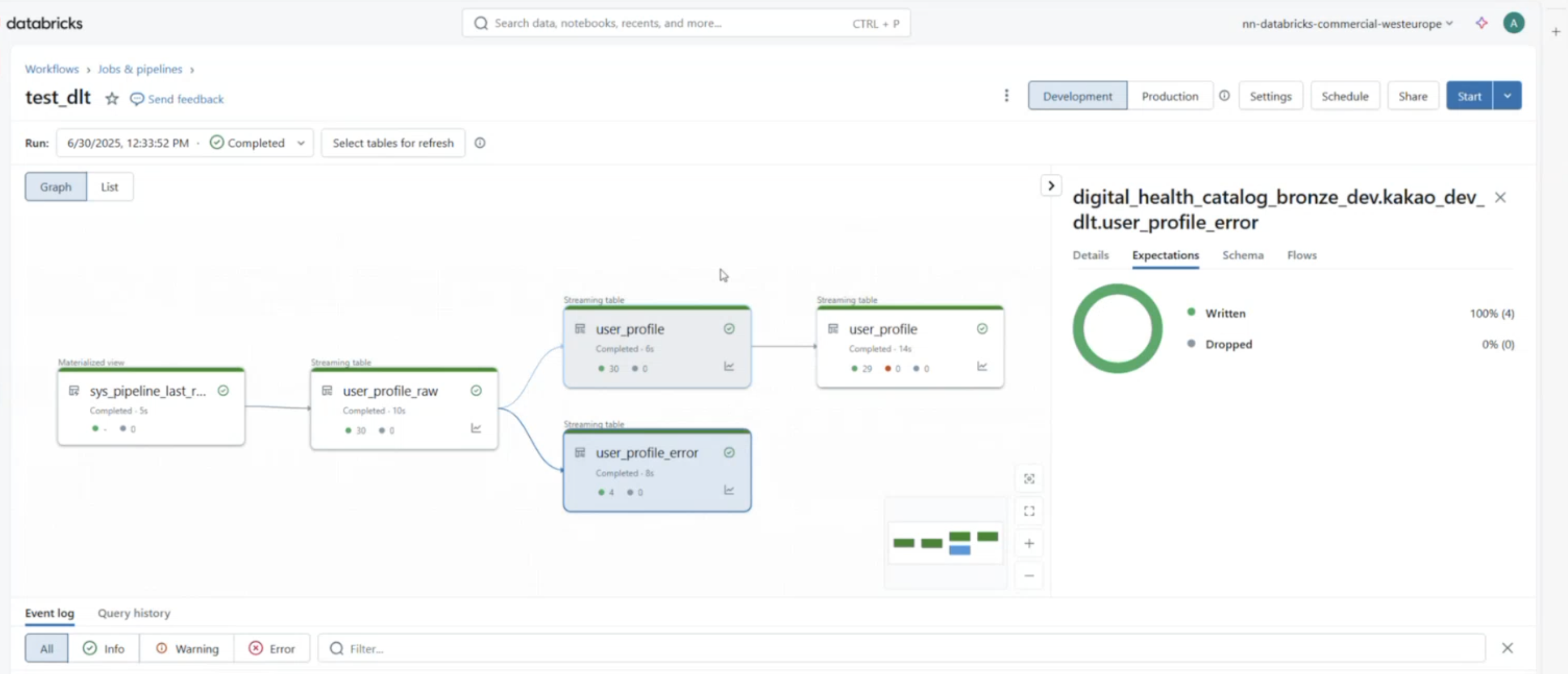
We include error table component into our pipeline and finally above snippet gives a glimpse of how the DLT pipeline graph looks like. A great feature of DLT is that we can also view the metrics expectations checks and get a view of overall health of the data.