Go to Playbook Main Page
Next: File Ingestion Using Autoloader(Python)
Back: Back to previous page
File Ingestion Pipeline: Overview#
Introduction#
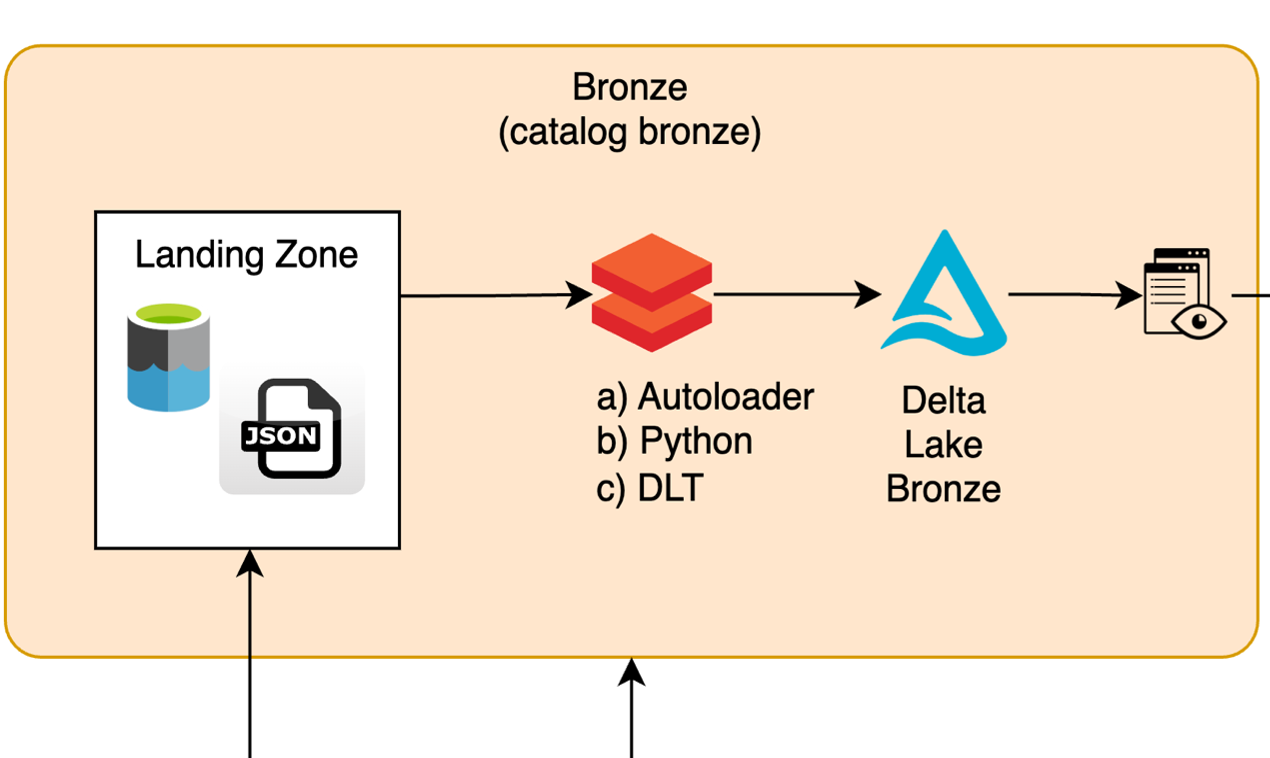
The File Ingestion Pipeline architecture is designed to support multiple ingestion methods while ensuring operational consistency, scalability, and observability. This pipeline processes structured, semi-structured, and unstructured data files from the Landing Zone to the Bronze Layer in Databricks, leveraging tools such as Autoloader, Python-based pipelines, and Delta Live Tables (DLT).
The process includes metadata enrichment, validation, and management of both successfully processed files and invalid records. Below is the high-level architecture:
-
High-Level Process Flow
- Landing Zone - Data Validation and Enrichment - Persisting Data in the Bronze Layer - Processed File Management -
Key Components
- Description of essential components such as Landing Zone, Autoloader, Python-Based Pipelines, and more. -
Metadata Added by Autoloader
- A detailed list of critical metadata fields added during the ingestion process.
High-Level Process Flow#
1. Landing Zone#
- Incoming raw files are stored in an Azure Data Lake (ADLS2 Blob Storage) Landing Zone, which is mapped as a Databricks Volume through Unity Catalog.
- Supported file types include structured (e.g., CSV), semi-structured (e.g., JSON), and unstructured data.
2. Data Validation and Enrichment#
- Data is ingested using one of the following methods:
- Autoloader for incremental, real-time ingestion.
- Python-based pipelines for batch processing with custom logic.
- Delta Live Tables (DLT) for declarative workflows with built-in validations.
- Metadata is added for traceability and governance:
ingestion_time: Timestamp when the record was ingested.file_name: Name of the source file.job_id: Unique execution identifier for the pipeline.sys_source_filename: Traceability of file origin.sys_received_at: Timestamp tracking data receipt into the pipeline.- Invalid or malformed records are routed to a bad files directory for troubleshooting and later resolution.
3. Persisting Data in the Bronze Layer#
- The cleaned and enriched data is stored in Delta tables within the Bronze Layer, ensuring ACID compliance.
- Partitioning is applied as needed for optimized querying and faster reads.
- Metadata annotations enable lineage tracking and observability, helping users understand data flow and transformations.
4. Processed File Management#
- Files successfully processed are moved to the loaded directory, ensuring that they are not reprocessed.
- Error logs and validation results are generated for operational insights and debugging.
Key Components#
| Component | Description |
|---|---|
| Landing Zone | Staging area in Azure Data Lake where raw JSON files reside, mapped as Databricks Volumes to Unity Catalog. |
| Autoloader Ingestion | Stream-based ingestion tool with schema evolution capabilities, designed for high scalability and efficiency. |
| Python-Based Pipeline | Custom batch ingestion pipeline that enables flexible, user-defined processing logic for specific use cases. |
| Delta Live Tables (DLT) | Declarative framework for building and maintaining managed pipelines with integrated data lineage and quality checks. |
| Bronze Layer | Delta table layer to store raw, validated data with added metadata for traceability and ACID compliance. |
| File Management | Mechanism for moving processed files to prevent reprocessing and routing invalid records to a bad file directory. |
Audit Date Added by Autoloader#
When files are ingested using Databricks Autoloader, several critical metadata fields are added automatically to enable traceability, data lineage, and governance. Below is the list of metadata fields:
| Metadata Field | Description |
|---|---|
ingestion_time |
Timestamp indicating when the data was ingested into the pipeline. |
file_name |
The name of the file from which the data was ingested. |
job_id |
A unique identifier associated with the specific pipeline execution. |
sys_source_filename |
The fully qualified name of the source file for traceability. |
sys_received_at |
Operational timestamp indicating when the data was received in Databricks. |
_metadata |
Autoloader-generated metadata, including file offsets, event time, and schema evolution details. |