New Developers Onboarding#
Purpose#
This document outlines all the initial steps needed to onboard new developers who are part of the Novo Nordisk Databricks team. The sections below outline or provide references to all necessary steps to:
- Gain access/authentication to Novo Nordisk systems.
- Gain authorization based on the roles and responsibility model outlined in the documentation.
- Become aware of and stay compliant with all necessary processes in Novo Nordisk.
Contribution#
In order to contribute, a few prerequisites are needed:
- You need to complete the assigned trainings in ISOtrain. There are a few SOPs that are relevant. (For a full course list, see here)
| Course ID | Module ID |
|---|---|
| 280006 | NN-PDP-GDPR |
| Q054929 | NN-RM-GDP-S |
| Q190751 | NN-RM-PROTECT-INFO-S |
| Q216301 | NN-IT-MANAGE-INFRA-S |
| Q166087 | NN-QUALITY-MAN-SOP |
| Q127938 | NN-IT-CONDUCT |
| Q187219 | NN-IT-MANAGE-IT-S |
| Q204010 | NN-IT-DATA-INTEGRITY |
| Q0859589 | DDIT-DATACORE New |
| 330739 | CMCCS-BLIND-OUTSIDE (NOT FOUND!) |
-
Read carefully the Data Core Developer's Handbook.
-
Get familiar with the SDLC that we use. You can read more about it in the DataCore release documentation.
-
Please also see the GDAI QMS - we will need to follow a mix of these.
Prerequisites#
This document assumes that the details of the new associate are shared with the corresponding Novo Nordisk HR team so that they can generate the Novo Nordisk identity for the new team member. The Novo Nordisk HR team will need some personal information, such as name and phone number, to generate the 4-character Novo Nordisk ID.
User ID activation#
Once the new developer receives emails from the HR team about the creation of their new ID, there are a few steps to be carried out. At this stage, the person may or may not have a Novo Nordisk-provided device. Assuming that external candidates do not have Novo Nordisk-provided devices, here are the steps to activate the Novo Nordisk ID.
Account First-Time Setup#
- Make sure you received two emails with:
- A temporary one-time password (TAP) attached.
- An initial password.
- Go to MS Security Info and log in using your Novo Nordisk ID and TAP
(IMPORTANT: Not the initial password).
[!TIP] If you are struggling to log in to your Novo Nordisk account using the temporary password provided by HR, please refer to this section: nn_account_issues
- Configure MFA with the Microsoft Authenticator App.
- Change your initial password to a secure password.
- Add your phone number to be able to reset your password in the future.
Citrix Cloud Desktop#
In order to access restricted Novo Nordisk resources, you will need to do that from a verified device. Cloud Desktop is considered a trusted device.
Cloud Desktop A#
At the beginning, you will have Cloud Desktop A available. To set it up:
- Go to NN Cloud Desktop and log in with your account.
- You should already have a
Cloud Desktop Adesktop created. Run it. The first time you run it, it may take some time—please be patient. - When the desktop starts, you can configure Teams and Outlook applications.
- You can set up VS Code and GitHub Desktop to work with code, but be aware that this setup can be reset at any time.
Congratulations! You have your Novo Nordisk workstation up and running.
Cloud Desktop M#
You can request a more powerful desktop with more software installed. It is more convenient for software development. See the full list of software installed on the Cloud Desktop M page.
To request the desktop:
- Go to Novo Nordisk Access ->
Manage My Accessand use the search to request: - Cloud Desktop : M - Guest developers (Non MAP) on Cloud Desktop_AD
- Wait for approval.
When the desktop is ready and you have ensured it is up and running, don't forget to request the dismissal of Cloud Desktop A:
- Go to Novo Nordisk Access ->
Manage My Access. - Choose
Remove accessat the top of the page. - Find
Cloud Desktop A. - Click the red cross.
- Submit.
See development environment setup recommendations in [Development Environment Setup].
User Access#
Once you are here, congratulations—you have made it into the Novo Nordisk system. There are a couple of steps to ensure you can access the project-related artefacts. There are a few tools needed to access project-related artefacts.
SailPoint Access Request#
In order to get basic access to resources (e.g. GitHub), you need to use the link below:
[!IMPORTANT] Please only use an authorized Novo Nordisk resource to access the website, as all access to Novo Nordisk accounts is limited to Novo Nordisk-certified devices only. https://novoaccess.corp.novocorp.net/identityiq/home.jsf
This is a SailPoint link that allows you, among other things to request to be added to respective AD groups so that you can have access.
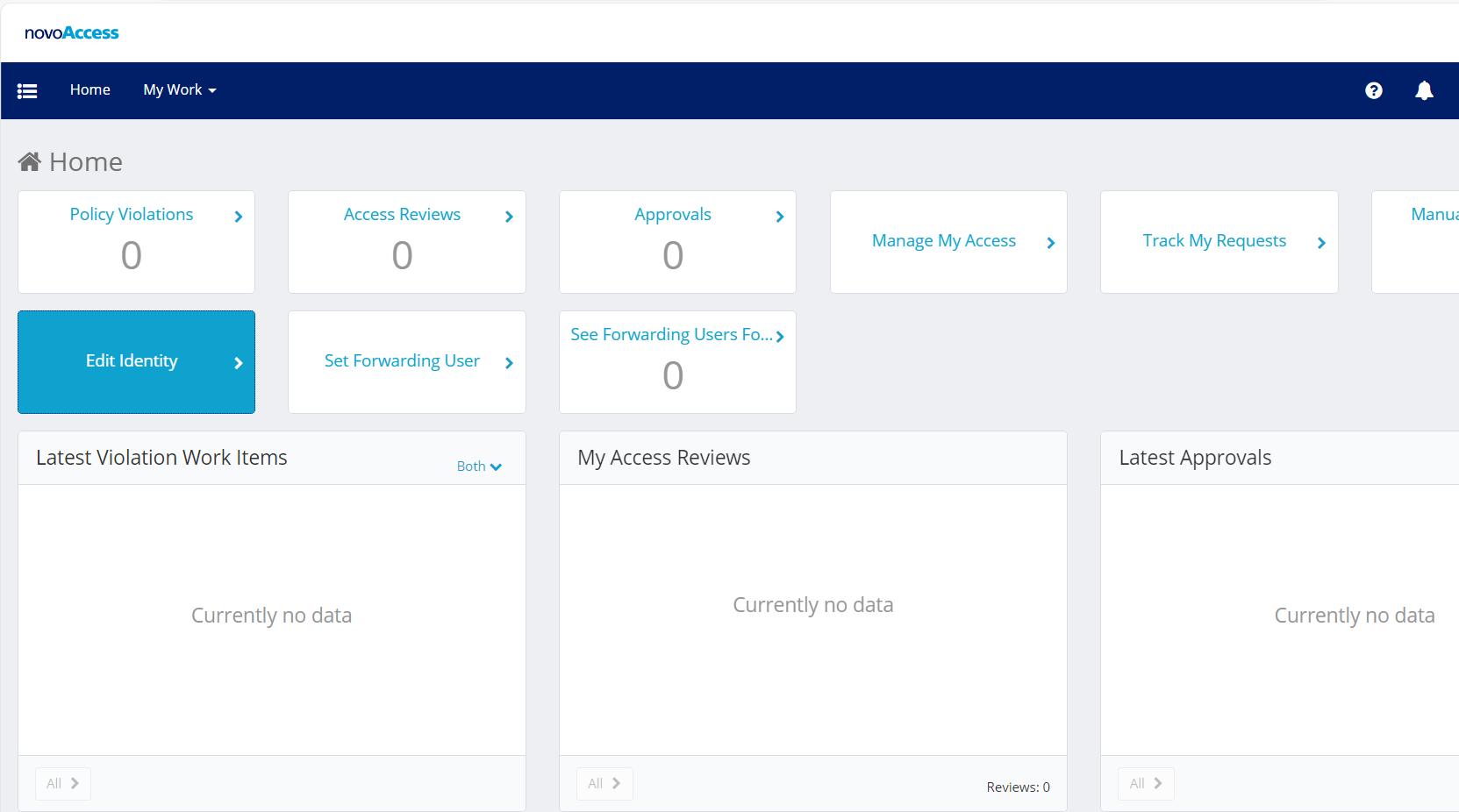
Once you are through, the page will look like below:
GitHub Access#
Please ensure you do not already have GitHub access assigned here. Look out for Add Entitlement: Github : NN-GitHub-Users on GitHub_AD.
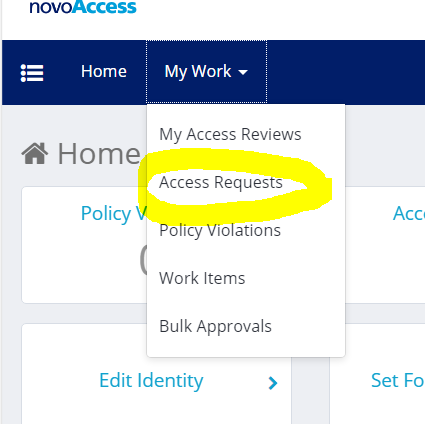
Request GitHub access as below:
Click on "Manage My Access" and check the box.

The screen should look like below.
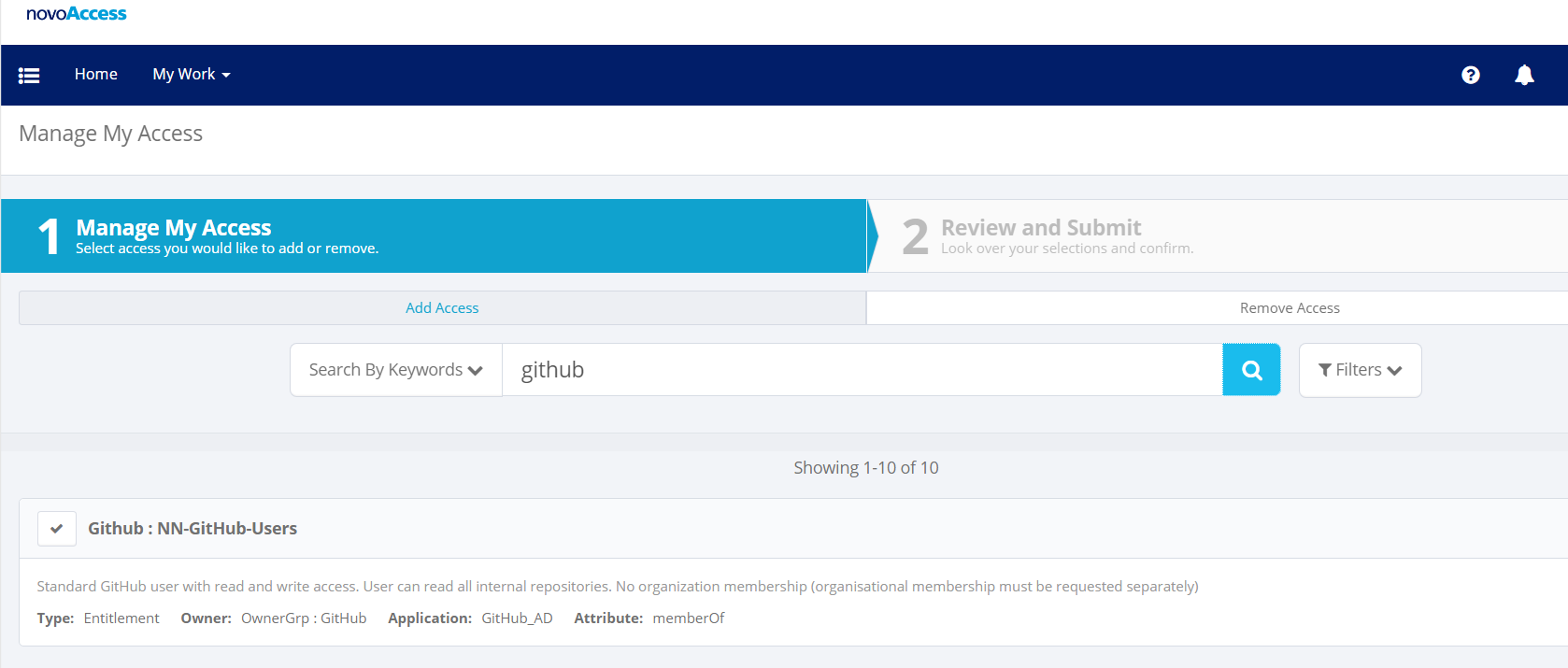
Submit the request after clicking the "Next" button and wait for its approval.
The following access is available in relation to GitHub
- Github : NN-GitHub-Users on GitHub_AD
- Github : NN-GitHub-Copilot on GitHub_AD (optional)
After NN-GitHub-Users is provided, request authorization to GitHub by asking the product owner for membership in the nn-databricks-platform team.
Admin Account#
Admin accounts in Novo Nordisk are accounts used to administer cloud resources. After the request for admin account is completed, you can find your credentials in PIM:
- Go to https://pim.novonordisk.com.
- Click
All Accounts. - Find your
adminXXXXaccount. - Click
...to the right and choose copy. This will place your admin password into the clipboard.Hold "Alt" / "Option" to enable Pan & Zoom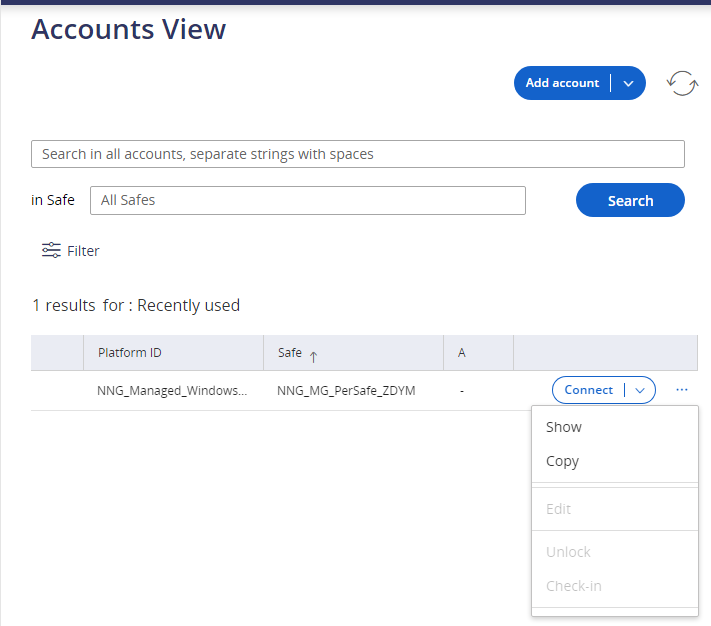
Now you can log in with your admin account and the password from the clipboard.
Go to Novo Nordisk Access -> Manage My Access and use the search to request access for your admin account (adminXXXX):
- Cloud Group : AZR-NN-O2_Databricks-DEV_Contributor on Azure Active Directory
- Cloud Group : AZR-NN-JZTSNETWORK-POC_Contributor on Azure Active Directory
- Cloud Group : AZR-NN-DATABRICKS-POC_Contributor on Azure Active Directory
- Cloud Group : AZR-NN-DBX_CORP-POC_Contributor on Azure Active Directory
- Cloud Group : AZR-NN-DATABRICKS-DEV_Contributor on Azure Active Directory
- Cloud Group : AZR-NN-DATABRICKS-VAL_Contributor on Azure Active Directory
- Cloud Group : AZR-NN-DATABRICKS-TST_Contributor on Azure Active Directory
- Cloud Group : AZR-NN-DATABRICKS-PRD_Contributor on Azure Active Directory
AWS Databricks Access#
Follow the documentation on how to get access to AWS Databricks.
Compliance Related and Documentation#
Here are some important URLs:
| URL | Purpose |
|---|---|
| https://novonordisk-qualitydocs.veevavault.com/ui/#t/0TB000000000101/all?fcah=&initSrch=false | Veeva Vault site to store all official documentation. |
| https://novonordisk.service-now.com/it?id=it_my_cases | ServiceNow portal to request several services, password changes, etc. |
| https://dev.azure.com/novonordiskit/ | Novo Nordisk Azure DevOps site for all projects. The project Projects status has the data core repositories. The repository names start with dc-. |
| https://github.com/orgs/innersource-nn/projects/54 | Novo Nordisk Databricks GitHub project |
| https://isotrain.novonordisk.com | ISOtrain site. You must finish all assigned trainings within the deadline. |
| https://novoaccess.corp.novocorp.net/identityiq/home.jsf | SailPoint access for AAD access management and requests |
| https://novonordisk-qualitydocs.veevavault.com/ui/#t/0TB000000000101/all?fcah=&initSrch=false | Veeva Vault site to store all official documentation. |
| https://novonordisk.service-now.com/it?id=it_my_cases | ServiceNow portal to request several services, password changes, etc. |
| https://dev.azure.com/novonordiskit/ | Novo Nordisk Azure DevOps site for all projects. The project Projects status has the data core repositories. The repository names start with dc-. |
| https://eu.degreed.com/dguserkl44glw/dashboard/discover | Degreed site for further trainings and sessions |
| https://datacore-docs.azurewebsites.net/development/developer_handbook/ | This handbook establishes guidelines that developers (SMEs) must follow to develop any business application whose OMD/O&M adopts it. |
| https://passwordreset.microsoftonline.com/ | Use this link to reset your password. To use the link, the first login must configure MFA. |