*** This is a draft version ***
- Introduction
- Bronze Layer Overview
- Purpose of Bronze layer
- Structure of a Bronze layer Schema
- Considerations for Bronze Layer Table Structure
- Challenges and Considerations
- Silver Layer
- Structure of a Silver layer Schema
- Bronze to Silver Design
- Bronze to Silver Layer Transformation (Metadata Management, SCD1 and SCD2) ---code examples
- Configuration Files
- Utility Functions
- Quality Framework
- Infrastructure Management
- Transformation Logic
- Pipelines 1 - Python
- Pipelines 2 - DLT
- Pipeline Testing
- Conclusion
- Conclusion - have a section that shows the final outcome, e.g data sitting in table, how we query it
Introduction#
In today's data-driven landscape, the seamless management of data across various layers is essential for effective analytics and informed decision-making. This write-up focuses on the transition from the Bronze layer to the Silver layer within a Databricks project. The Bronze layer serves as the initial repository for raw data collected from diverse sources, while the Silver layer presents a refined and structured version of this data, tailored for analytical purposes.
We will explore the detailed processes involved in this transformation, emphasizing their significance in enhancing data usability. Additionally, we will discuss the architectural considerations that underpin this transition, with a particular focus on ensuring data quality and effective metadata management throughout the entire journey.
Bronze Layer Overview#
The bronze layer serves as the foundational stage of a data lake architecture in Databricks, acting as a staging area for diverse data types, including structured, semi-structured, and unstructured formats (e.g., JSON, CSV, logs).
Purpose of Bronze layer#
The Bronze layer fulfills several key roles:
- Raw Data Repository: It securely stores unprocessed data in its native format, ensuring retention for historical reference and audits.
- Flexibility in Data Ingestion: The layer supports diverse data types from structured (relational databases) to semi-structured (JSON, XML) and unstructured sources (text files, images).
- Initial Data Quality Checks: While data remains untransformed, preliminary quality checks help identify inconsistencies or issues that need addressing before transitioning to the Silver layer.
- Foundation for Further Processing: It provides a crucial base for transformations in the Silver layer, enabling all analytical and business intelligence operations that depend on the Bronze data.
For more about how the data is ingested into bronze layer please refer File Ingestion Guide
Structure of a Bronze layer Schema#
When determining the table structure of the Bronze layer in a data architecture, several key considerations should be kept in mind to ensure that the design effectively supports data ingestion, quality, and future processing.
Example Schema: user_activity_bronze#
The schema of the Bronze layer table captures essential attributes related to user activities. Below is a detailed representation of what this might look like:
| Attribute Name | Type | Description |
|---|---|---|
| userId | Integer | Unique identifier for each user. Used as the primary key. |
| activityType | String | Type of user activity performed (e.g., Running, Walking). |
| duration | String (ISO 8601) | Duration of the activity in ISO 8601 format (e.g., PT30M). |
| createdAt | Timestamp | Timestamp of when the activity was recorded. |
| sys_received_at | Timestamp | Timestamp of when the record was ingested into the Bronze layer. |
| sys_is_deleted | Boolean | Indicator of whether the record is marked for deletion. |
| sys_dq_status | Tinyint | Status indicating data quality (0: Valid, 1: Warning, 2: Fatal). |
| sys_dq_messages | Array |
Messages related to data quality assessments. |
| sys_modified_at | Timestamp | Timestamp of the last modification made to the record. |
| sys_job_id | String | Identifier for the job or pipeline run that processed the record. |
Sample Data in the Bronze Layer#
| userId | activityType | duration | createdAt | sys_received_at | sys_is_deleted | sys_dq_status | sys_dq_messages | sys_modified_at | sys_job_id |
|---|---|---|---|---|---|---|---|---|---|
| 1 | Running | PT30M | 2023-01-01 08:00:00 | 2023-01-01 08:01:00 | False | 0 | NULL | 2023-01-01 08:00:00 | job123 |
| 1 | Walking | PT1H | 2023-01-02 09:00:00 | 2023-01-02 09:01:00 | False | 1 | ["Warning: Check"] | 2023-01-02 09:00:00 | job123 |
| 2 | Cycling | PT45M | 2023-01-02 10:00:00 | 2023-01-02 10:01:00 | False | 0 | NULL | 2023-01-02 10:00:00 | job123 |
| 2 | Running | PT20M | 2023-01-03 07:30:00 | 2023-01-03 07:31:00 | False | 0 | NULL | 2023-01-03 07:30:00 | job124 |
| 1 | Swimming | PT30M | 2023-01-03 10:00:00 | 2023-01-03 10:01:00 | True | 0 | NULL | 2023-01-03 10:00:00 | job124 |
Considerations for Bronze Layer Table Structure#
1. Data Types and Formats#
- Diverse Sources: The Bronze layer will likely consolidate data from various sources, including structured (databases), semi-structured (JSON, XML), and unstructured formats. Ensure that the schema can accommodate these data types.
- Choosing Appropriate Data Types: Select the appropriate data types (e.g., integer, string, timestamp) based on the expected data fields. Using proper types can improve storage efficiency and processing speed.
2. Key Identifiers#
- Primary Keys: Define key columns (such as
userIdin our example) to uniquely identify each record. Ensure that primary keys allow for easy deduplication and conflict resolution. - Unique Constraints: Consider which columns should have unique constraints to maintain integrity, especially when dealing with longitudinal data.
3. Metadata Management#
- System-related Columns: Include metadata fields prefixed with
sys_to support data quality tracking, auditing, and lineage. Key metadata columns to consider: sys_dq_statussys_received_atsys_job_idsys_modified_atsys_is_deleted
4. Data Quality Assurance#
- Quality Check Indicators: Implement columns to track data quality messages and statuses. For example:
sys_dq_messagesto capture error or warning messages related to data integrity.sys_dq_statusto indicate the quality state of each record.- Initial Quality Checks: Plan for initial assessments and target how this data will be evaluated before proceeding to the Silver layer.
5. Scalability and Performance#
- Design for Growth: The table structure should allow for scalability as data volumes grow. Consider partitioning strategies or sharding if applicable.
- Indexes and Optimization: While the Bronze layer may not require extensive indexing, consider logical partitioning and organization based on expected query patterns.
Challenges and Considerations#
While the Bronze layer serves many essential functions, it also presents certain challenges:
-
Data Quality: Ensuring that the incoming data meets specific quality requirements from the outset can be difficult, requiring automated and ongoing quality checks.
-
Storage Management: As data volume grows, managing storage and ensuring efficient querying for raw data can become a concern.
-
Understanding Data Lineage: Maintaining clear documentation about the sources of data and its quality history can be crucial for auditability and compliance.
Silver Layer#
The silver layer is critical for transforming raw data into a structured and insightful format suitable for analytical operations. Several reasons underscore the importance of the silver layer:
-
Data Quality Improvement: The Silver layer allows for the application of data quality checks and validation, ensuring that the dataset is reliable and usable for analytics.
-
Schema Enforcement: It contains structured and enriched records that adhere to a predefined schema, making it easier to perform analytics.
-
Historical Data Management: The Silver layer can store historical versions of records through Slowly Changing Dimensions (SCD), ensuring that changes are tracked over time.
-
Enhanced Usability: The Silver layer is designed to cater to business intelligence tools and analytical queries, providing stakeholders with valuable insights.
Structure of a Silver layer Schema#
Example Schema: user_activity_silver#
The Silver layer contains a structured and cleaned representation of the data, enriched with additional columns and transformed to improve data quality.
Table Structure#
| Attribute Name | Type | Description |
|---|---|---|
| user_id | Integer | Unique user identifier, renamed from userId. |
| activity_type | String | Type of activity, normalized to a consistent format. |
| created_at | Timestamp | Timestamp of the activity, standardized for analysis. |
| duration_seconds | Double | Duration in seconds, converted from the string format. |
| created_at_local | Timestamp | Local timestamp for user activity. |
| sys_received_at | Timestamp | Timestamp of when the record was ingested. |
| sys_job_id | String | Identifier for the job that processed the record. |
| sys_valid_from | Timestamp | Indicates when the record becomes valid for historical tracking. |
| sys_valid_until | Timestamp | Marks the end of the record's validity period. |
| sys_is_latest_version | Boolean | Indicates if the record is the most recent version. |
| sys_is_duplicate | Boolean | Indicates if the record has duplicates. |
| sys_dq_status | Tinyint | Tracks the quality status of the record (0: Valid, 1: Warning, 2: Fatal). |
Example Data in Silver Layer#
| user_id | activity_type | created_at | duration_seconds | created_at_local | sys_received_at | sys_job_id | sys_valid_from | sys_valid_until | sys_is_latest_version | sys_is_duplicate | sys_dq_status |
|---|---|---|---|---|---|---|---|---|---|---|---|
| 1 | Running | 2023-01-01 08:00:00 | 1800 | 2023-01-01 08:00:00 | 2023-01-01 08:01:00 | job123 | 2023-01-01 08:00:00 | 9999-12-31 23:59:59 | TRUE | FALSE | 0 |
| 1 | Walking | 2023-01-02 09:00:00 | 3600 | 2023-01-02 09:00:00 | 2023-01-02 09:01:00 | job123 | 2023-01-02 09:00:00 | 9999-12-31 23:59:59 | TRUE | FALSE | 1 |
| 2 | Cycling | 2023-01-02 10:00:00 | 2700 | 2023-01-02 10:00:00 | 2023-01-02 10:01:00 | job123 | 2023-01-02 10:00:00 | 9999-12-31 23:59:59 | TRUE | FALSE | 0 |
| 2 | Running | 2023-01-03 07:30:00 | 1200 | 2023-01-03 07:30:00 | 2023-01-03 07:31:00 | job124 | 2023-01-03 07:30:00 | 9999-12-31 23:59:59 | TRUE | FALSE | 0 |
| 1 | Swimming | 2023-01-03 10:00:00 | 1800 | 2023-01-03 10:00:00 | 2023-01-03 10:01:00 | job124 | 2023-01-03 10:00:00 | 9999-12-31 23:59:59 | TRUE | FALSE | 0 |
Bronze to Silver Design#
The solution architecture for transitioning from the Bronze to Silver layer involves a series of processes and technologies deployed within Databricks. The transformation strategy utilizes both batch processing and streaming, allowing for real-time analytics where required. Key components of the solution include:
- Apache Spark: Leveraged for scalable data processing.
- Delta Lake: Ensures reliable storage with capabilities for ACID transactions, schema enforcement, and time travel.
- Metadata management frameworks to maintain an overview of data lineage and quality.
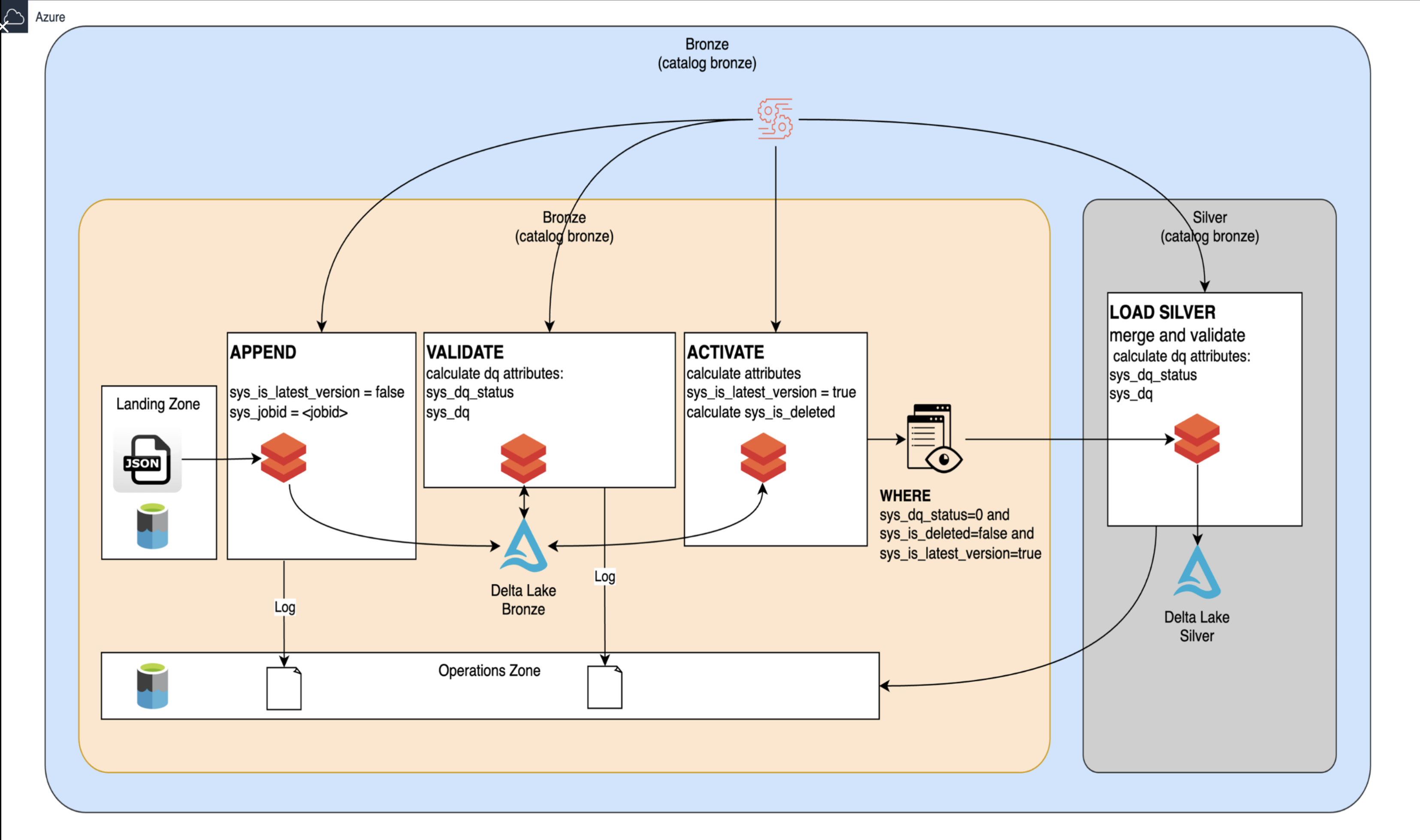
This diagram provides a visual representation of the data flow and processes involved in transitioning from the Bronze layer to the Silver layer in a Databricks project. Let’s integrate this visual information into the write-up by elaborating on the processes depicted in the diagram, detailing their roles, and how they fit into the overall transition.
-
Landing Zone
At the far left is the Landing Zone, where raw data files in formats such as JSON are initially deposited. This serves as the entry point for data ingestion into the data pipeline. -
Append Process
When data is loaded from the Landing Zone: The APPEND step is executed, where the incoming data is marked with specific metadata attributes: -sys_is_latest_version = false: This indicates that the newly ingested records are not currently the latest. -sys_jobid = <jobid>: This captures the identifier of the job that processed the incoming data, which is useful for tracking data lineage and processing audits. -
Validation
Next, the data moves into the VALIDATE phase: During this step, data quality (DQ) attributes are calculated. Key attributes include: -sys_dq_status: This indicates the overall data quality state (e.g., valid, warning, or fatal). -sys_dq: This captures additional data quality metrics.
The validated records are then stored in Delta Lake Bronze, where they can be further processed and queried.
-
Activation
Following validation, the ACTIVATE process updates certain attributes of the records: This step calculates: -sys_is_latest_version = true: This attribute is set for records that are deemed the most current version. -sys_is_deleted: This attribute indicates if a record has been flagged for deletion. -
Load Silver
Once the records have been activated, the final step is LOAD SILVER: This phase involves merging the validated records into the Silver layer where processed data is stored. The loading operation applies additional data quality checks based on specific conditions: -sys_dq_status = 0: Ensures only records that have passed all quality checks are included. -sys_is_deleted = false: Excludes any records that have been marked as deleted. -sys_is_latest_version = true: Ensures only the latest versions of the records are loaded into Silver. -
Log and Operations Zone
Throughout the process: An operations log is maintained to track data movements and transformations from the Landing Zone through the Bronze layer to the Silver layer. This log helps ensure accountability and transparency in the data processing pipeline.
The relevance of the metadata attributes comes in handy here and the following article gives a detail description on how we are using and managing metadata Metadata management
Bronze to Silver Layer Transformation (Metadata Management, SCD1 and SCD2) - Code Examples#
Transforming data from the bronze to silver layer involves key concepts such as: - Metadata Management: Maintaining metadata to document the structure, semantics, and lineage of data helps users understand the context and origins of the data.
-
Slowly Changing Dimensions (SCD): Implementing SCD Type 1 allows for the overwriting of existing records to reflect current information, while SCD Type 2 enables historical tracking by maintaining versions of records with added timestamps.
-
Data Cleaning and Data Quality: This includes data cleaning (removing duplicates, filling missing values), standardizing formats, and applying business rules.
Configuration Files#
constant.py#
The constant.py file defines constants that are typically used across the project. This includes Layers, which specify data layers (Bronze, Silver, Gold), and Tables, which list the relevant database tables.
Example: - Constants for Layers: ```python Layers: - "bronze" - "silver" - "gold"
databricks_config.py#
This module configures the environment settings for processing within Databricks.
Example Function:#
get_databricks_configuration(env: str, layer: str):#
- Retrieves configuration settings for the specified layer in a given environment (dev/tst/val/prd).
Example Data:#
environment = "dev"
layer = "silver"
config = get_databricks_configuration(env=environment, layer=layer)

{
    "databricks": {
        "catalog": "digital_health_catalog_silver_dev",
        "schema_base": "kakao",
        ...
    }
}
Utility Functions#
databricks_utils.py get_svcs(env: str | None) -> dict Returns a dictionary of essential services needed for processing.
svcs = get_svcs(env="dev")
# Sample output
{
    "spark": <SparkSession>,
    "dbutils": <DBUtils>,
    "logger": <Logger>
}
sql_convert_schema_to_create_table(...)#
Converts schema definitions into SQL CREATE TABLE statements.
Example:
- Given a schema for the Silver user_activity, it produces:
CREATE TABLE IF NOT EXISTS `digital_health_catalog_silver`.`kakao`.`user_activity` (
    user_id INT,
    activity_type STRING,
    duration STRING,
    created_at TIMESTAMP,
    ...
)
Quality Framework#
Maintaining data quality between the bronze and silver layers is crucial. Strategies include: - Reference Data: Using a common reference dataset for standardization (e.g., country codes, currency exchange rates) ensures consistency across data sources. - Data Quality Monitoring: Implementing validation checks and quality rules during the transformation process helps to detect anomalies and enforce standards. - Tooling: Employ tools such as Apache Deequ or Delta Lake's built-in capabilities to automate data quality verification, ensuring that high data standards are met before data is consumed.
Data Quality and Data Harmonization (Reference Data and Enforcing Data Quality)#
please refer Data Quality Checks and Policies
databricks_quality_framework.py check_primary_key_nulls(...) Checks for NULL values in primary key columns.
Example:
| userId | activityType | ...
|--------|--------------|
| 1      | Running      |
| NULL   | Walking      |  <-- This will trigger a null check.
This will mark the record as invalid due to the NULL value in the userId field.
check_lookup_values(...)#
Validates if lookup values exist in reference tables.
Example:
* If activityType should reference a valid activity lookup:
| activityType |
|--------------|
| Running      |
Infrastructure Management#
databricks_infrastructure.py create_schema(...) Creates schemas and necessary directories for the Silver layer.
Example:
If called with:
create_schema(svcs, conf)
It creates the schema kakao under the catalog digital_health_catalog_silver, setting up the environment.
Transformation Logic#
databricks_util_silver.py execute_scd1_merge_query(...) Handles SCD Type 1 updates, merging current records from the Bronze layer into the Silver layer.
What are Slowly Changing Dimensions (SCD 1 AND 2)#
Example:
Running on the user activities:
execute_scd1_merge_query(svcs, "digital_health_catalog_silver.kakao.user_activity", "bronze_view", "user_activity")
Example:
If userId 1 has a new Running activity, this function: Updates the existing record's sys_valid_until timestamp to the start of the new activity. Creates a new record that captures the new activity's details.
Pipelines 1 - Python#
Python-based pipelines in Databricks are often used for data transformation tasks. This includes: - ETL Processes: Extracting data from the bronze layer, transforming it using Python scripts (e.g., pandas), and loading it into the silver layer. - Data Orchestration: Utilizing libraries such as Apache Airflow or Databricks Jobs to manage and schedule these workflows. - Custom Algorithms: Implementing Python code for specific business logic such as filtering, aggregating, or enriching data.
Pipelines 2 - DLT#
Delta Live Tables (DLT) provide a framework to simplify the creation of data pipelines by automatically managing the data transformation processes. Key features include: - Declarative Pipelines: Users define data transformations as SQL or Python code in a simplified manner, allowing for easier design and maintenance. - Automatic Data Quality: DLT incorporates automated data quality checks to ensure that input data meets predefined quality standards. - Monitoring and Alerts: DLT provides insights into pipeline performance and alerts for any issues encountered during execution.
Pipeline Testing#
Robust testing is essential for maintaining the integrity of data transformations. Strategies involve: - Unit Testing: Developing unit tests for individual transformation functions to verify correctness. - Integration Testing: Testing the complete pipeline to ensure all components work seamlessly together. - Automated Testing Tools: Utilizing frameworks such as pytest for Python or Databricks Notebooks for systematic testing to ensure reliability and efficiency in the data transformation process.
Conclusion#
In conclusion, the transition from the bronze to silver layers in a Databricks project is a critical step towards establishing a reliable data architecture. The structured data residing in the silver layer not only facilitates better data analytics but also enhances data integrity and accessibility. By employing effective transformation strategies, robust quality control measures, and optimized pipelines, organizations can unlock valuable insights from their data and leverage it for informed decision-making. Ultimately, the silver layer empowers users to query and interact with data more effectively, leading to improved business outcomes.