User profile
- Delta Live Table: File Ingestion and Processing for User Profile Data
- Steps
- Summary of Delta Tables in the Pipeline
- Key System Columns
- Final Flow Diagram
Delta Live Table: File Ingestion and Processing for User Profile Data#
This section explains the end-to-end process of file ingestion using Delta Live Tables (DLT) for user profile data. The pipeline processes raw data from the Landing Zone, validates and enriches it with metadata fields for lineage and auditing, harmonizes attributes, and integrates the data into a Silver layer while maintaining SCD (Slowly Changing Dimensions) Type 2 integrity.
Steps#
Step 1: Load Raw Data from Landing Zone#
Purpose:
Ingest raw JSON data from the Landing Zone into a Bronze Delta table using the DLT streaming framework. Enrich the data with operational metadata for traceability and management.
Significance:
- Facilitates fault-tolerant ingestion with incremental updates.
- Captures operational metadata (sys_job_id, sys_received_at, etc.) for lineage tracking.
- Prepares data for downstream validation and harmonization processes.
Added Metadata Fields:
- sys_surrogate_pk: A unique surrogate key generated using uuid() for each record.
- sys_job_id: The pipeline execution ID for tracking.
- sys_source_file_name: The name of the source file the data originated from.
- sys_received_at: Timestamp when the data was ingested into the pipeline.
- sys_modified_at: Captures the modification timestamp for each record using a custom UDF.
Explanation:
- Input Data:
- JSON files from the landing zone path.
- Operations:
- Incrementally reads raw data using cloud_files (autoloader)
- Cross-joins pipeline metadata (sys_pipeline_last_run) for operational context.This is a materialised view that contains the databricks environment information which can be used for further processing.
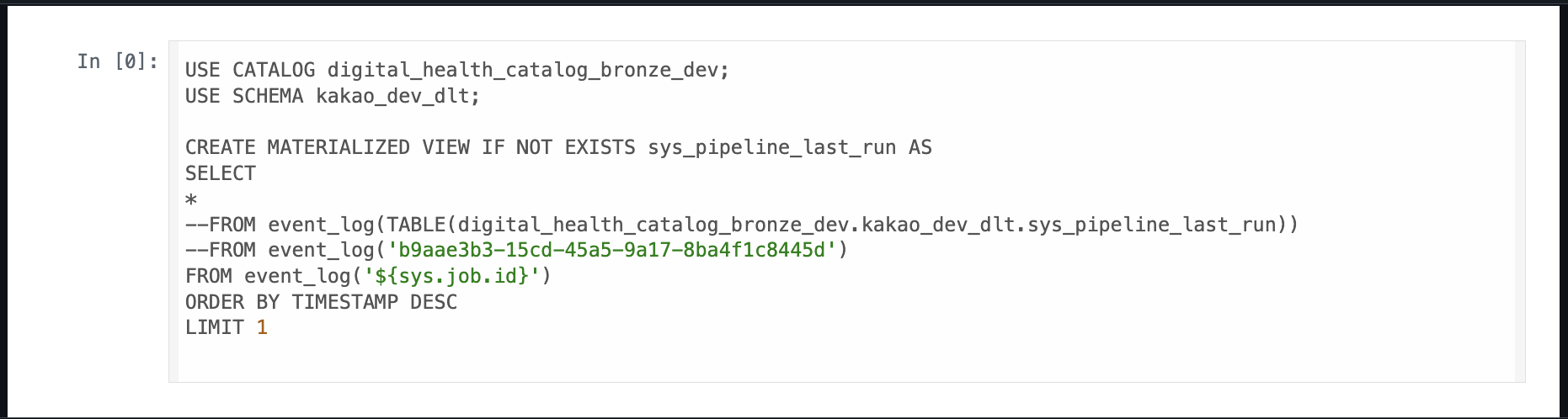
- The bad records gets loaded to a separate directory of the bad records file path which can be sent to the producers for rectification.
- Outputs:
- Raw structured data enriched with system metadata columns in the
user_profile_rawDelta table.
Reference Code ℹ️#
-- STEP 1 LOAD RAW DATA FROM LANDING ZONE
CREATE OR REFRESH STREAMING TABLE user_profile_raw
COMMENT 'Raw data from kakao landing zone for user_profile'
TBLPROPERTIES('quality' = 'bronze',
              'source'  = 'kakao')
PARTITIONED BY (sys_source_file_name)
AS
SELECT
   uuid()                            as sys_surrogate_pk,
   data.*,
   pipeline.origin.update_id         as sys_job_id,           -- pipeline run id.
   _metadata.file_name               as sys_source_file_name,
   pipeline.timestamp                as sys_received_at,
   digital_health_catalog_bronze_dev.kakao_dev_dlt.get_modified_at(_metadata.file_name, sys_source_file_name, 'file_name') as sys_modified_at
FROM cloud_files(
                 "${path}user_profile//","json",
                 map("schema", "struct<userId:int, birthYear:int, diabetesType:string, appVersion:string, osVersion:string, createdAt:string>",
                "badFilesPath","${bad_files_path}")
) as data
CROSS JOIN sys_pipeline_last_run pipeline;
Step 2: Validate Data and Harmonize Attributes#
Data Validation#
Purpose:
Applies data quality constraints to ensure data integrity and relevance. Invalid rows (e.g., missing critical fields) are dropped.
Validation Constraints:
1. mandatory_createdAt: Ensures the created_at column is not null.
2. mandatory_userId: Ensures the user_id column is not null. Rows violating this constraint are dropped.
3. can_not_harmonize_diabetes_type: Ensures the diabetes_type column is not null. Rows violating this constraint are dropped.
4. harmonized_diabetes_type: Ensures the harmonized value (diabetes_type) matches the raw attribute value (original_diabetes_type).
Attribute Harmonization#
Purpose:
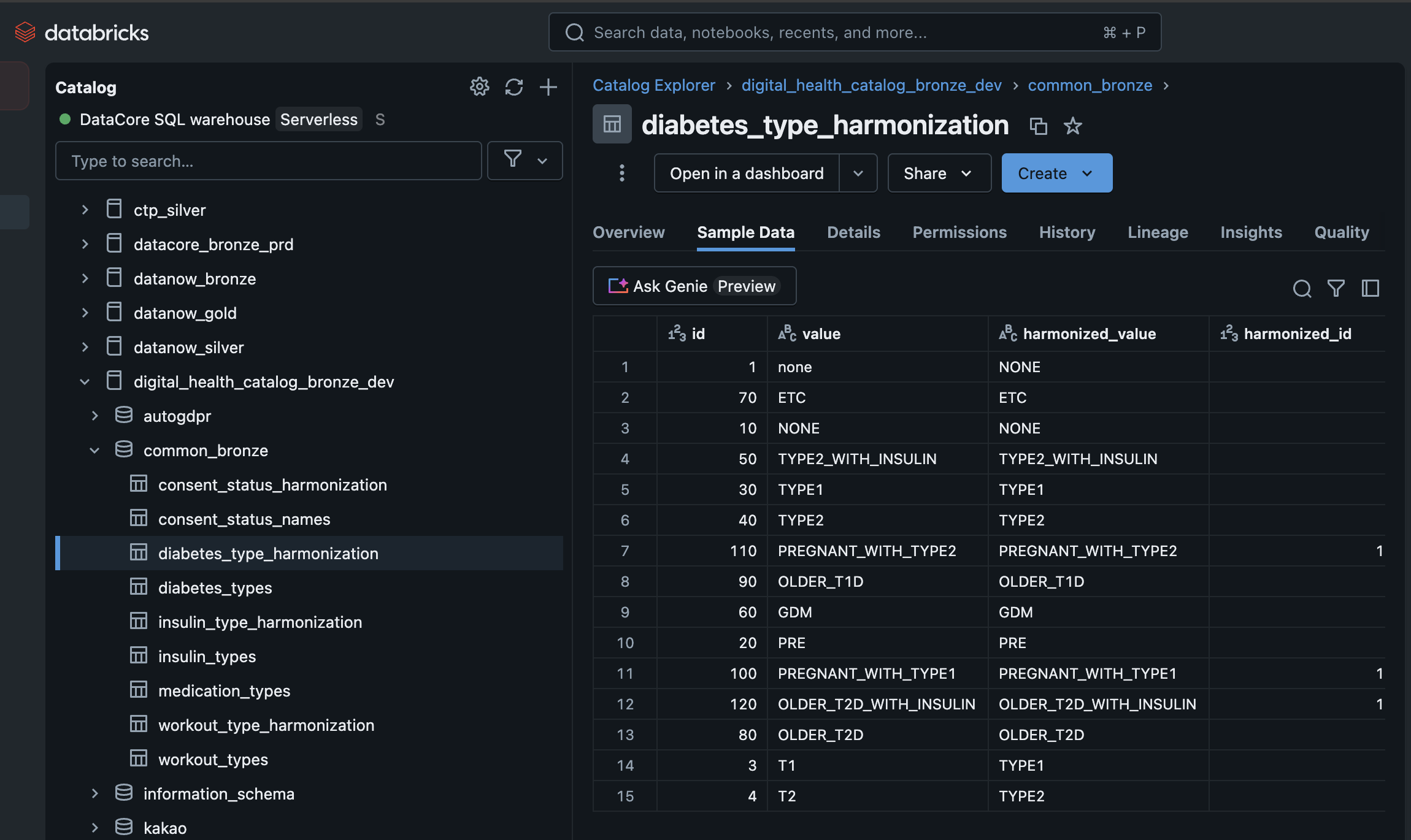
Maps raw attribute values (diabetesType) to standardized, harmonized values (diabetes_type) using a reference table (diabetes_type_harmonization).
Significance:
- Ensures consistent attribute representation across datasets.
- Drops or flags rows for which harmonization cannot be performed.
Data Validation and Harmonization Workflow:
1. Reads data incrementally from the Bronze table (user_profile_raw).
2. Performs constraints validation and data harmonization with a reference dataset.
3. Outputs validated, harmonized data to the user_profile Delta table while excluding invalid records.
Reference Code ℹ️#
-- STEP 2 VALIDATE DATA QUALITY & HARMONIZE
CREATE OR REFRESH STREAMING TABLE user_profile
(
  CONSTRAINT mandatory_createdAt EXPECT (created_at IS NOT NULL),
  CONSTRAINT mandatory_userId EXPECT (user_id IS NOT NULL) ON VIOLATION DROP ROW,
  CONSTRAINT can_not_harmonize_diabetes_type EXPECT (diabetes_type IS NOT NULL) ON VIOLATION DROP ROW,
  CONSTRAINT harmonized_diabetes_type EXPECT (diabetes_type IS NOT NULL and diabetes_type = original_diabetes_type)
)
COMMENT 'Validated. harmonized data for user_profile'
TBLPROPERTIES('quality' = 'bronze',
              'source'  = 'kakao')
AS
SELECT
     sys_surrogate_pk,
     userId as user_id, birthYear as birth_year, appVersion as app_version, osVersion as os_version, createdAt as created_at,
     dth.harmonized_value as diabetes_type,up.diabetesType as original_diabetes_type
     ,sys_modified_at, sys_source_file_name, sys_received_at
FROM STREAM(LIVE.user_profile_raw) as up
LEFT JOIN common_bronze.diabetes_type_harmonization dth ON up.diabetesType  = dth.value;
Here is a glimpse of the diabetes_type_harmonization table looks like:
Step 3: Integrate Validated Data to Silver Layer#
Purpose:
Integrates validated, harmonized, and deduplicated data from the Bronze layer into the Silver layer while maintaining SCD (Slowly Changing Dimension) Type 2 logic.
Significance:
- Ensures data is deduplicated and historized with proper lineage and modification tracking.
- Silver tables serve as a clean layer for downstream analytics with enhanced data quality.
- SCD Type 2 maintains historical versions of each record.
Key Features of SCD Type 2 Implementation:
1. Deduplication and Integration:
- Ensures proper versioning of records.The "APPLY CHANGES" step in the code ensures that.
- Ensures no duplicate rows are inserted.
- Integrates harmonized data into the Silver layer
- Uses business key (user_id) for record tracking
-
Data Evolution: - Uses
sys_modified_atas the timestamp to track sequential changes - Maintains historical versions of records - Creates new versions when attributes change -
Stored Columns: - Excludes certain columns (e.g.,
original_diabetes_type) - Retains all business and system columns - Preserves data lineage information
Reference Code ℹ️#
-- STEP 3 INTEGRATE TO SILVER
CREATE OR REFRESH STREAMING TABLE digital_health_catalog_silver_dev.kakao_dev_dlt.user_profile
COMMENT 'Validated, harmonized, deduplicated and historised  data for user_profile'
TBLPROPERTIES('quality' = 'bronze',
              'source'  = 'kakao');

APPLY CHANGES INTO digital_health_catalog_silver_dev.kakao_dev_dlt.user_profile
FROM STREAM(LIVE.user_profile)
KEYS(user_id)
--APPLY AS DELETE WHEN sys_is_deleted = true
SEQUENCE BY sys_modified_at
COLUMNS * EXCEPT (original_diabetes_type)
STORED AS SCD TYPE 2;
Summary of Delta Tables in the Pipeline#
user_profile_raw: Raw data ingested from the landing zone, enriched with metadata fields.user_profile: Validated and harmonized Bronze table after applying data quality checks and attribute harmonization.digital_health_catalog_silver_dev.kakao_dev_dlt.user_profile: Silver table with validated, harmonized, deduplicated, and historized data stored with SCD Type 2 logic.
Key System Columns#
| Column Name | Purpose |
|---|---|
sys_surrogate_pk |
Unique identifier for each record. |
sys_job_id |
Tracks the pipeline job execution responsible for the record. |
sys_source_file_name |
Name of the file the record was ingested from. |
sys_received_at |
Timestamp when the record was ingested. |
sys_modified_at |
Timestamp for record-level modifications to maintain data evolution. |
diabetes_type |
Harmonized attribute derived from the raw field (up.diabetesType). |
Final Flow Diagram#
+------------------------+     +-----------------------------+     +-----------------------------+     +--------------------------------+
|     Source Data        |     |         Bronze Table       |     |         Bronze Table       |     |         Silver Table           |
|    Landing Zone       ----->|    user_profile_raw        ----->|      user_profile          ----->|       user_profile             |
|     JSON Files        |     |                           |     |                           |     |                              |
+------------------------+     +-----------------------------+     +-----------------------------+     +--------------------------------+
         |                              |                              |                                |
         |                              |                              |                                |
    Raw JSON Data               Added Metadata &                Data Validation &                  SCD Type 2
    - userId                    System Columns:                 Harmonization:                    Implementation:
    - birthYear                 - sys_surrogate_pk             - Quality constraints             - Version tracking
    - diabetesType             - sys_job_id                   - Field standardization           - History preservation
    - appVersion               - sys_source_file_name         - Reference data mapping          - Start/End dates
    - osVersion                - sys_received_at              - Business rules                  - Current flag
    - createdAt                - sys_modified_at              - Error handling              - Exclude original_diabetes_type
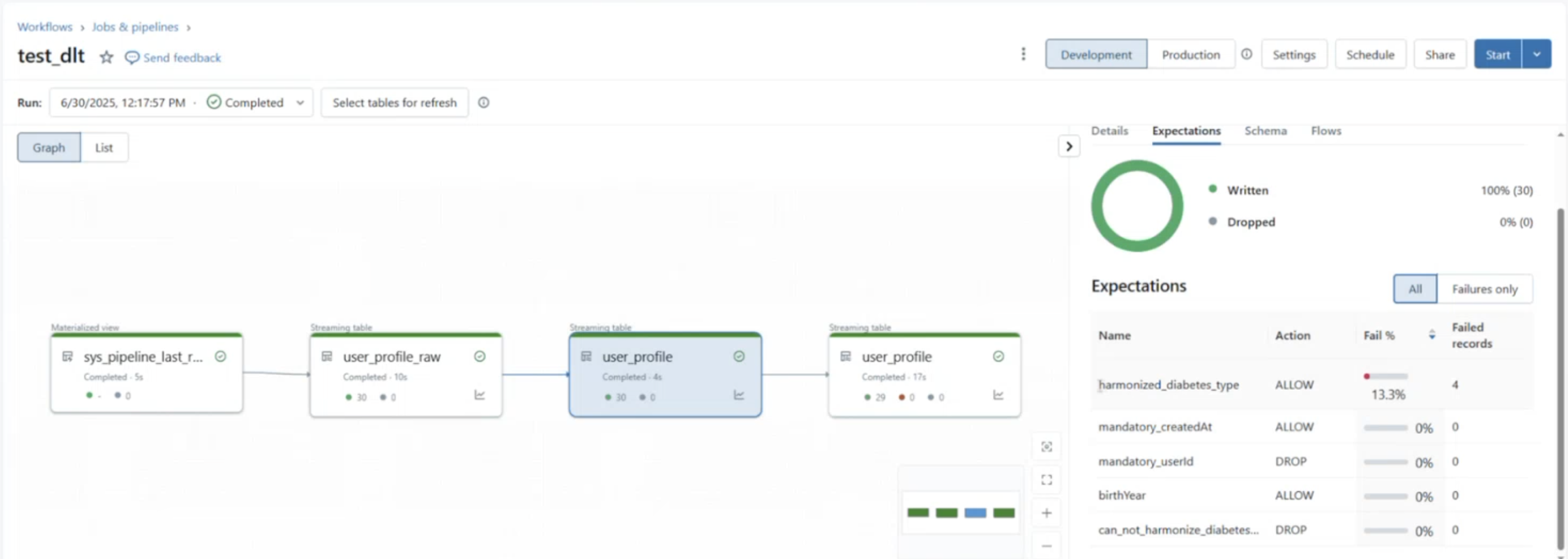
Here is a snippet from databricks on how the user profile pipeline looks like. Interesting thing to note here is how we can view the metrics of the validation/expectation checks that we applied in our DLT code in parallel.
Data Flow Details:
-
Source Data (Landing Zone) - Format: JSON files - Location: Cloud storage - Schema: Contains user profile data fields - Key fields: userId, birthYear, diabetesType, appVersion, osVersion, createdAt
-
Bronze Table (
user_profile_raw) - Quality: Bronze - Type: Streaming Delta Table - Added metadata: sys_surrogate_pk, sys_job_id, etc. - Partitioned by: sys_source_file_name -
Validated & Harmonized Bronze Table (
user_profile) - Quality: Bronze - Type: Streaming Delta Table - Validation: Data quality constraints - Harmonization: Standardized diabetes_type values - Business logic: Field mapping and transformations -
Silver Table (
digital_health_catalog_silver_dev.kakao_dev_dlt.user_profile) - Quality: Silver - Type: Delta Table with SCD Type 2 - Features: Version history and tracking - Key columns: All except original_diabetes_type - Change tracking: Using sys_modified_at and version flags
Data Quality Progression: - Landing → Bronze: Raw data preservation with metadata - Bronze → Validated Bronze: Data quality enforcement - Validated Bronze → Silver: Business logic implementation with historical tracking